launchshots / showcase / reference / tradutor ia - talk & translate

Tradutor IA - Talk & Translate

Reference ★ 4.6 (888) Grátis +4 228.9 MB

Chart position — tracked daily by LaunchShots

#52 of 100
Top Free Reference · Saudi Arabia
best #52 · 1 day tracked · as of Oct 25
— / 7d
#60 of 100
Top Free Reference · Australia
best #29 · 26 days tracked · as of Nov 22
▼ 10 / 7d
#64 of 100
Top Free Reference · Brazil
best #28 · 10 days tracked · as of Nov 22
▼ 31 / 7d
#65 of 100
Top Free Reference · Canada
best #60 · 19 days tracked · as of Nov 22
▲ 5 / 7d
#71 of 100
Top Free Reference · Italy
best #61 · 27 days tracked · as of Nov 23
▲ 9 / 7d
+ 4 more charts

Screenshot changes — detected by LaunchShots

Oct 17, 2026
Tradutor IA - Talk & Translate replaced the screenshot images (same count, theme and layout). →
Oct 9, 2026
Tradutor IA - Talk & Translate added 1 iPhone screenshot (8 → 9). →
Aug 24, 2026
Tradutor IA - Talk & Translate added 2 iPhone screenshots (6 → 8). →

Screenshot style breakdown

Sampled from 6 of Tradutor IA - Talk & Translate's App Store screenshots — background, accent and theme, measured by LaunchShots (not something Apple publishes).

Use this style →
9 iPhone screenshots · 9 iPad Mixed light / dark Background changes per screenshot
#ECF4FC bg #CFD6DD #046CCC accent #111111 text
vs. Reference apps we've analysed (2341): 43% use a light theme; 33% put the caption above the phone — Tradutor IA - Talk & Translate uses no captions; the average set has 6.1 screenshots — Tradutor IA - Talk & Translate ships 9. Full Reference benchmark →

Screenshots

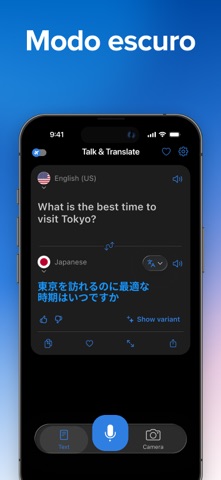
#1 Tradutor IA - Talk & Translate iPhone screenshot 1
#2 Tradutor IA - Talk & Translate iPhone screenshot 2
#3 Tradutor IA - Talk & Translate iPhone screenshot 3
#4 Tradutor IA - Talk & Translate iPhone screenshot 4
#5 Tradutor IA - Talk & Translate iPhone screenshot 5
#6 Tradutor IA - Talk & Translate iPhone screenshot 6
#7 Tradutor IA - Talk & Translate iPhone screenshot 7
#8 Tradutor IA - Talk & Translate iPhone screenshot 8
#9 Tradutor IA - Talk & Translate iPhone screenshot 9

iPad screenshots

#1 Tradutor IA - Talk & Translate iPad screenshot 1
#2 Tradutor IA - Talk & Translate iPad screenshot 2
#3 Tradutor IA - Talk & Translate iPad screenshot 3
#4 Tradutor IA - Talk & Translate iPad screenshot 4
#5 Tradutor IA - Talk & Translate iPad screenshot 5
#6 Tradutor IA - Talk & Translate iPad screenshot 6
#7 Tradutor IA - Talk & Translate iPad screenshot 7
#8 Tradutor IA - Talk & Translate iPad screenshot 8
#9 Tradutor IA - Talk & Translate iPad screenshot 9

Icon palette

extracting…
Dominant colors sampled from the icon — click any swatch to copy the hex.

About this app

Talk & Translate é um tradutor com IA para voz, fala ao vivo, texto e fotos em mais de 100 idiomas, com modo offline completo. Fale e seja compreendido em cerca de um segundo, aponte a câmera para um cardápio ou uma placa de rua, ou transcreva e traduza uma reunião inteira em tempo real. Feito para viajantes, profissionais, estudantes e qualquer pessoa que precise se comunicar em vários idiomas. ■ O que o Talk & Translate pode fazer? Cinco funções em um só aplicativo: • Tradutor de voz: conversas bidirecionais em tempo real • Transcrição ao vivo: transcrição contínua da fala com tradução, ideal para reuniões e aulas • Tradutor de texto: mensagens, e-mails, documentos e qualquer coisa que você possa colar • Tradutor de câmera: cardápios, placas, etiquetas e documentos impressos • Tradutor de câmera em RA: aponte para um objeto e veja como ele se chama ■ Quais idiomas o Talk & Translat…

App details

Bundle ID
com.mobisystems.MSTranslator
Latest version
7.3.1
Released
May 25, 2016
Last updated
Nov 13, 2026
Languages
14 (EN, FR, DE, EL, IT…)
Genres
Referência, Educação

What you can learn from Tradutor IA - Talk & Translate

Every shipping app on the App Store has gone through the same decisions you're working through right now: which screenshot goes first, what caption sits over it, which device frame to show, what color the background should be. The 18 screenshots above are Tradutor IA - Talk & Translate's answers to those questions — they're public, they're real, and they made it through Apple's review.

What the numbers say: Tradutor IA - Talk & Translate runs a mixed light-and-dark set where the background shifts from screenshot to screenshot (first shot #ECF4FC) — each image has to stand on its own, so the captions carry more of the story. The accent colour we picked up, #046CCC, is the one to reuse for badges, arrows and highlighted words if you borrow this look. Hit Use this style to open the editor with these exact colours and drop your own screenshot in.

Notice the first screenshot in particular. It's the one users see in search results and on the product page, and it's where most apps spend their best caption and tightest design. Look at the proportion of background to phone, where the text sits, what one thing the image is trying to communicate.

Want to see how other Reference apps approach the same problem? Browse more Reference apps in the showcase.

Take what works into your own screenshots

Open LaunchShots and design your App Store & Google Play screenshots — pick a device frame, drop captions, ship in minutes. Free, in your browser.

Open the screenshot editor →

Apps with a similar look

Closest background + accent colours among the listings we've analysed — useful when you want to see the same palette handled by a different team.

Pra Já Metropolitano
#ECF4FC #0474CC
EPoint-Theo dõi điện hàng ngày
#ECF4FC #0464D4
Cartão Carrefour: Crédito e +
#ECF4FC #0C64C4
Tunnel (new) - Workspace ONE
#ECF4FC #0C64C4
WiFi Passwords: 3M+ Hotspots
#ECF4FC #0C64C4
Atanalım: Tercih Rehberi
#E4F4FC #0464CC

More Reference apps

Latest from the blog

ASO
Google Play Promotional Content: Setup and Assets for In-App Events
Nov 23, 2026
Guides
Configuring Game Center in App Store Connect: Leaderboards and Achievements
Nov 22, 2026
News
Google Play Financial Features Declaration: Avoid Suspensions
Nov 21, 2026
Guides
iOS & Android App Accessibility Guide for Indie Developers
Nov 20, 2026
1 / 1
copied