Chart position — tracked daily by LaunchShots
Screenshot changes — detected by LaunchShots
Screenshot style breakdown
Sampled from 6 of LingoLooper: AI 영어회화 스피킹's App Store screenshots — background, accent and theme, measured by LaunchShots (not something Apple publishes).
#FC641C bg
#FC793B
#7C4CAC accent
#FFFFFF text
Screenshots

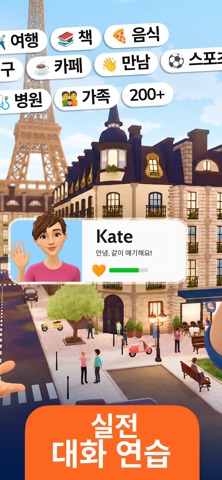


iPad screenshots


Icon palette
About this app
AI 캐릭터와 소리 내어 말하며 영어 회화를 연습해요. 일본어, 스페인어, 프랑스어 등 30개 이상의 언어와 방언도 함께 연습할 수 있어요. 캐릭터가 내 말을 듣고 대답하며, 대화가 끊기지 않게 도와줘요. 정해진 대본도, 지루한 반복 훈련도, 평가하는 시선도 없어요. 단어는 아는데 막상 말하려고 하면 머리가 하얘지나요? LingoLooper는 영어로 말하는 게 자연스럽게 느껴질 때까지 실제 같은 대화를 연습하는 곳이에요. 지구본에서 가고 싶은 곳을 골라 그곳에서 살아 보세요. 뉴욕에서 병원 진료를 받고, 파리에서 커피를 주문하고, 도쿄의 공원에서 주말 이야기를 나눠 보세요. 모든 대화는 말로 이루어지고, 똑같은 대화는 하나도 없어요. 일상적인 장소에서 대화하다 보면 실제로 쓰는 표현이 자연스럽게 입에 붙어요. 【단어는 아는데 말이 안 나오는 분을 위한 앱이에요】 학원도 다녀 보고 다른 앱도 써 봤는데 아직 대화가 어렵나요? 그동안 부족했던 건 직접 입을 열고 말해 보는 연습이에요. 틀려도 아무도 평가하지 않으니, 부담 없이 마음껏 말해 …
App details
What you can learn from LingoLooper: AI 영어회화 스피킹
Every shipping app on the App Store has gone through the same decisions you're working through right now: which screenshot goes first, what caption sits over it, which device frame to show, what color the background should be. The 12 screenshots above are LingoLooper: AI 영어회화 스피킹's answers to those questions — they're public, they're real, and they made it through Apple's review.
What the numbers say: LingoLooper: AI 영어회화 스피킹 runs a mixed light-and-dark set where the background shifts from screenshot to screenshot (first shot #FC641C) — each image has to stand on its own, so the captions carry more of the story. The accent colour we picked up, #7C4CAC, is the one to reuse for badges, arrows and highlighted words if you borrow this look. Hit Use this style to open the editor with these exact colours and drop your own screenshot in.
Notice the first screenshot in particular. It's the one users see in search results and on the product page, and it's where most apps spend their best caption and tightest design. Look at the proportion of background to phone, where the text sits, what one thing the image is trying to communicate.
Want to see how other Education apps approach the same problem? Browse more Education apps in the showcase.
Take what works into your own screenshots
Open LaunchShots and design your App Store & Google Play screenshots — pick a device frame, drop captions, ship in minutes. Free, in your browser.
Open the screenshot editor →Apps with a similar look
Closest background + accent colours among the listings we've analysed — useful when you want to see the same palette handled by a different team.