Chart position — tracked daily by LaunchShots
Screenshot changes — detected by LaunchShots
Screenshot style breakdown
Sampled from 6 of Lifebear カレンダーと手帳で予定表スケジュール管理's App Store screenshots — background, accent and theme, measured by LaunchShots (not something Apple publishes).
#244CAC bg
#4265B7
#FCEC0C accent
#FFFFFF text
Screenshots
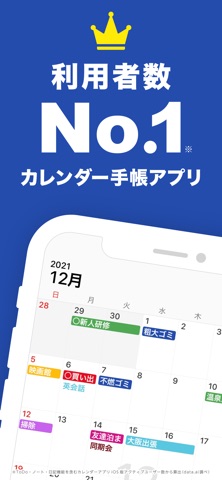


iPad screenshots


Icon palette
About this app
『使いやすい最強のカレンダー(手帳)アプリ』として雑誌をはじめ、数多くのメディアに取り上げられています!会員登録不要ですぐに簡単に使えます! Lifebearはカレンダーの「使いやすさ」にこだわっているのはもちろんのこと、 紙の手帳で出来るようなタスク管理、ノート、日記をひとつにまとめた日本最大級のオールインワン型手帳アプリです。 どこよりも「べんりで」「つかいやすい」そして「たのしい」アプリを目指して開発しています。ToDoリストやノート、日記がひとつになっているので他のアプリを行き来する必要がありません。またカスタマイズ性が抜群なので効率的に予定を管理することができます。楽しさの面では手帳のカバーのように使える「着せかえ」やペタペタと貼れるシールのような「スタンプ」が豊富にあります。またぜひ使ってて楽しくなるような、あなただけの手帳を楽しんでください! ******************************************** おすすめポイント!! ******************************************** ◆自分好みの使い方が出来るから…
App details
What you can learn from Lifebear カレンダーと手帳で予定表スケジュール管理
Every shipping app on the App Store has gone through the same decisions you're working through right now: which screenshot goes first, what caption sits over it, which device frame to show, what color the background should be. The 16 screenshots above are Lifebear カレンダーと手帳で予定表スケジュール管理's answers to those questions — they're public, they're real, and they made it through Apple's review.
What the numbers say: Lifebear カレンダーと手帳で予定表スケジュール管理 runs a mixed light-and-dark set where the background shifts from screenshot to screenshot (first shot #244CAC) — each image has to stand on its own, so the captions carry more of the story. The accent colour we picked up, #FCEC0C, is the one to reuse for badges, arrows and highlighted words if you borrow this look. Hit Use this style to open the editor with these exact colours and drop your own screenshot in.
Notice the first screenshot in particular. It's the one users see in search results and on the product page, and it's where most apps spend their best caption and tightest design. Look at the proportion of background to phone, where the text sits, what one thing the image is trying to communicate.
Want to see how other Productivity apps approach the same problem? Browse more Productivity apps in the showcase.
Take what works into your own screenshots
Open LaunchShots and design your App Store & Google Play screenshots — pick a device frame, drop captions, ship in minutes. Free, in your browser.
Open the screenshot editor →Apps with a similar look
Closest background + accent colours among the listings we've analysed — useful when you want to see the same palette handled by a different team.