Chart position — tracked daily by LaunchShots
Screenshot style breakdown
Sampled from 5 of E.YAZAWA -CLUB- 矢沢永吉オフィシャルアプリ's App Store screenshots — background, accent and theme, measured by LaunchShots (not something Apple publishes).
#FCFCFC bg
#DDDDDD
#644C34 accent
#111111 text
Reading the caption text from the screenshots in your browser…
Screenshots
Icon palette
About this app
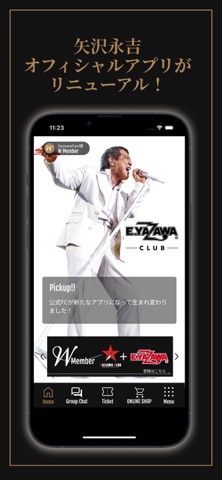
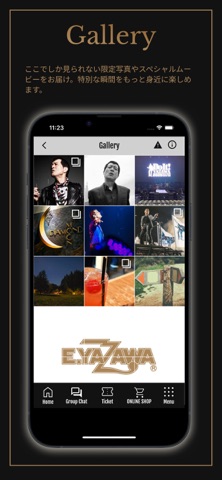
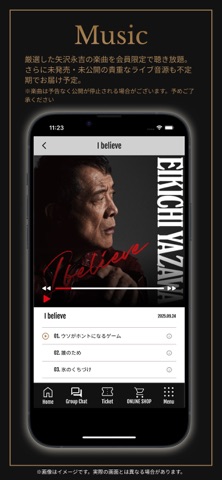
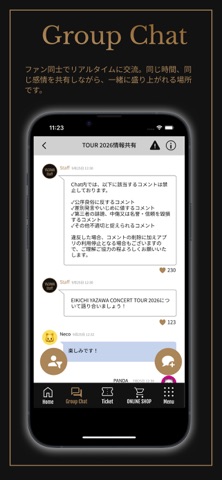
矢沢永吉オフィシャルアプリが、新たにリニューアルしました! これまで大切にしてきたファンの皆さまとのつながりはそのままに、アプリを通じて、より身近で特別な時間をお届けします。 最新情報のご案内はもちろん、リニューアルしたオフィシャルファンクラブ「E.YAZAWA -CLUB-」の会員様にはここでしか楽しめない限定コンテンツや特別企画など、ファンクラブならではの体験をお届けします。 新しく生まれ変わった矢沢永吉オフィシャルアプリで、特別な時間をお楽しみください。 〈主な機能〉 ● Gallery / Movie ここでしか見られない限定写真やスペシャルムービーをお届け。特別な瞬間をもっと身近に楽しめます。 ● Music 厳選した矢沢永吉の楽曲を会員限定で聴き放題でお届けします。 ※楽曲は予告なく公開が停止される場合がございます。予めご了承ください ● Group Chat ファン同士でリアルタイムに交流。同じ時間、同じ感情を共有しながら、一緒に盛り上がれる場所です。 ● Blog 活動の裏側や貴重なエピソードを公開。ここでしか知ることのできない…
App details
What you can learn from E.YAZAWA -CLUB- 矢沢永吉オフィシャルアプリ
Every shipping app on the App Store has gone through the same decisions you're working through right now: which screenshot goes first, what caption sits over it, which device frame to show, what color the background should be. The 5 screenshots above are E.YAZAWA -CLUB- 矢沢永吉オフィシャルアプリ's answers to those questions — they're public, they're real, and they made it through Apple's review.
What the numbers say: E.YAZAWA -CLUB- 矢沢永吉オフィシャルアプリ runs a mixed light-and-dark set where the background shifts from screenshot to screenshot (first shot #FCFCFC) — each image has to stand on its own, so the captions carry more of the story. The accent colour we picked up, #644C34, is the one to reuse for badges, arrows and highlighted words if you borrow this look. Hit Use this style to open the editor with these exact colours and drop your own screenshot in.
Notice the first screenshot in particular. It's the one users see in search results and on the product page, and it's where most apps spend their best caption and tightest design. Look at the proportion of background to phone, where the text sits, what one thing the image is trying to communicate.
Want to see how other Music apps approach the same problem? Browse more Music apps in the showcase.
Take what works into your own screenshots
Open LaunchShots and design your App Store & Google Play screenshots — pick a device frame, drop captions, ship in minutes. Free, in your browser.
Open the screenshot editor →Apps with a similar look
Closest background + accent colours among the listings we've analysed — useful when you want to see the same palette handled by a different team.