Chart position — tracked daily by LaunchShots
Screenshot changes — detected by LaunchShots
Screenshot style breakdown
Sampled from 6 of Top Widgets⁺ - 万能小组件手机桌面主题美化工具's App Store screenshots — background, accent and theme, measured by LaunchShots (not something Apple publishes).
#1C1C1C bg
#3B3B3B
#349CE4 accent
#FFFFFF text
Screenshots


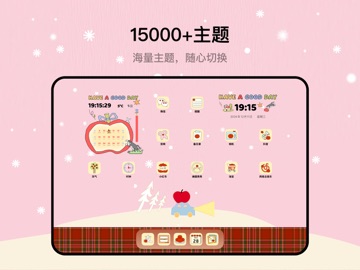
iPad screenshots



Icon palette
About this app
▶ OS27 全新特大号组件 ◀ ▶ App Store 人气推荐 · 百万用户选择 ◀ ▶ 5000+ 原创设计持续上新 ◀ 专为 OS27 焕新。Top Widgets⁺ 现已支持全新竖屏特大号组件,用一整页主屏幕装下更多信息、更丰富的布局和更鲜明的个性。 5000+ 专业原创设计持续更新。从小组件、动态壁纸到图标与主题,自由搭配并细调每个细节,让 iPhone 真正成为你的专属桌面。 【OS27 全新升级】 特大号组件:纵向铺满一整页主屏幕,信息更丰富,重要内容一眼看清。 更大空间,更好布局:日程、照片、时钟与常用信息从容组合,不再局限于传统尺寸。 四种尺寸自由选择:小号、中号、大号和特大号组件均可浏览和定制,适配不同桌面空间。 创作与分享:编辑时即可预览特大号组件效果,还能将你的设计生成 Live Photo 轻松分享。 【主要功能亮点】 X-面板:实时查看电量、存储、网络等信息,高效又酷炫 打工人日历 - 记录和表达每天心情,标记心情状态,打工人必备。 心情打卡 - 快速记录当前心情在桌面上,了解自己的情绪状态。 Today - 清楚地看到当天需要完成的任务,避免因为健忘而忘记…
App details
What you can learn from Top Widgets⁺ - 万能小组件手机桌面主题美化工具
Every shipping app on the App Store has gone through the same decisions you're working through right now: which screenshot goes first, what caption sits over it, which device frame to show, what color the background should be. The 16 screenshots above are Top Widgets⁺ - 万能小组件手机桌面主题美化工具's answers to those questions — they're public, they're real, and they made it through Apple's review.
What the numbers say: Top Widgets⁺ - 万能小组件手机桌面主题美化工具 runs a mixed light-and-dark set where the background shifts from screenshot to screenshot (first shot #1C1C1C) — each image has to stand on its own, so the captions carry more of the story. The accent colour we picked up, #349CE4, is the one to reuse for badges, arrows and highlighted words if you borrow this look. Hit Use this style to open the editor with these exact colours and drop your own screenshot in.
Notice the first screenshot in particular. It's the one users see in search results and on the product page, and it's where most apps spend their best caption and tightest design. Look at the proportion of background to phone, where the text sits, what one thing the image is trying to communicate.
Want to see how other Utilities apps approach the same problem? Browse more Utilities apps in the showcase.
Take what works into your own screenshots
Open LaunchShots and design your App Store & Google Play screenshots — pick a device frame, drop captions, ship in minutes. Free, in your browser.
Open the screenshot editor →Apps with a similar look
Closest background + accent colours among the listings we've analysed — useful when you want to see the same palette handled by a different team.