Screenshot style breakdown
Sampled from 5 of AmaZeus: Merge & Shoot's App Store screenshots — background, accent and theme, measured by LaunchShots (not something Apple publishes).
#040404 bg
#272727
#74CC14 accent
#FFFFFF text
Screenshots


Icon palette
About this app
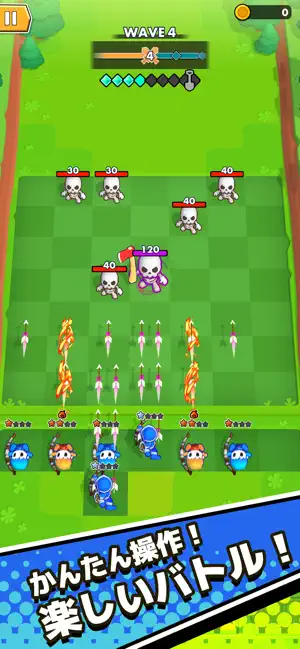
AmaZeus:世界を守り、力を解き放て! 世界は容赦ないモンスターの波に襲われている!強力な武器と戦略的なスキルの組み合わせで、モンスターを倒せるかはあなた次第。シンプルな弓矢から旅を始めよう!アイテムを合成して、ブーメランや銃、強力な大砲など、さらに強力な武器をアンロックしよう。様々なスキルの組み合わせを試して、ユニークで破壊的な効果を発動させ、戦いを優位に進めよう。あなたは世界を救うことができるだろうか? 主な特徴: - 合成シューターでパワーアップし、敵を倒そう! - シンプルな操作とパズルゲーム!自分のペースでプレイしよう。 - 革新的なローグライクスキル!新しい組み合わせを発見しよう! - エキサイティングなギミック満載の新ステージが待ち受けている!
App details
What you can learn from AmaZeus: Merge & Shoot
Every shipping app on the App Store has gone through the same decisions you're working through right now: which screenshot goes first, what caption sits over it, which device frame to show, what color the background should be. The 5 screenshots above are AmaZeus: Merge & Shoot's answers to those questions — they're public, they're real, and they made it through Apple's review.
What the numbers say: AmaZeus: Merge & Shoot runs a dark set where the background shifts from screenshot to screenshot (first shot #040404) — each image has to stand on its own, so the captions carry more of the story. The accent colour we picked up, #74CC14, is the one to reuse for badges, arrows and highlighted words if you borrow this look. Hit Use this style to open the editor with these exact colours and drop your own screenshot in.
Notice the first screenshot in particular. It's the one users see in search results and on the product page, and it's where most apps spend their best caption and tightest design. Look at the proportion of background to phone, where the text sits, what one thing the image is trying to communicate.
Want to see how other Games apps approach the same problem? Browse more Games apps in the showcase.
Take what works into your own screenshots
Open LaunchShots and design your App Store & Google Play screenshots — pick a device frame, drop captions, ship in minutes. Free, in your browser.
Open the screenshot editor →Apps with a similar look
Closest background + accent colours among the listings we've analysed — useful when you want to see the same palette handled by a different team.