Chart position — tracked daily by LaunchShots
Screenshot changes — detected by LaunchShots
Screenshot style breakdown
Sampled from 6 of 书径 - Kindle传书's App Store screenshots — background, accent and theme, measured by LaunchShots (not something Apple publishes).
#44A4FC bg
#3B90DD
#3CB44C accent
#111111 text
Reading the caption text from the screenshots in your browser…
Screenshots


iPad screenshots


Icon palette
About this app
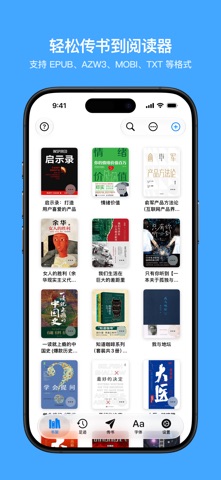
把手机里的电子书,无线传到 Kindle 或 Kobo。书径(Bookify)让你直接用 iPhone 或 iPad 导入和传送书籍,无需电脑和数据线,也无需为传书登录亚马逊账号。 【导入电子书,自动转换格式】 支持 EPUB、KEPUB、MOBI、AZW3、TXT 等常见格式,按你选择的 Kindle 或 Kobo 自动转换,省去手动转换的步骤。 从微信或网盘下载的电子书,可通过分享菜单导入书径,也可从“文件”App 中选择导入。 【封面与字体,按喜好整理】 换上喜欢的封面,修改书名和作者,让书籍更容易辨认。也可导入 TTF、OTF 字体并嵌入电子书,在支持的阅读器上使用喜欢的字体。 使用嵌入字体时,Kindle 可选择“出版方字体”,Kobo 可在支持的 EPUB/KEPUB 书籍中使用。 【连接阅读器,下载想读的书】 1. 在书径中选择 Kindle 或 Kobo,再导入电子书。 2. 将 iPhone 或 iPad 与阅读器连接到同一 Wi-Fi,在书径中打开“传书”。用阅读器浏览器访问 pair.bookify.top,再用书径扫描阅读器上显示的二维码。 3. 在阅读器打开的传书页面中,选择书籍并下载。 也可在阅读器浏览器输入书径显示的传书地址,手…
App details
What you can learn from 书径 - Kindle传书
Every shipping app on the App Store has gone through the same decisions you're working through right now: which screenshot goes first, what caption sits over it, which device frame to show, what color the background should be. The 12 screenshots above are 书径 - Kindle传书's answers to those questions — they're public, they're real, and they made it through Apple's review.
What the numbers say: 书径 - Kindle传书 runs a light set with one background colour (#44A4FC) carried across every screenshot — the listing reads as a single poster when the shots sit side by side in search results. The accent colour we picked up, #3CB44C, is the one to reuse for badges, arrows and highlighted words if you borrow this look. Hit Use this style to open the editor with these exact colours and drop your own screenshot in.
Notice the first screenshot in particular. It's the one users see in search results and on the product page, and it's where most apps spend their best caption and tightest design. Look at the proportion of background to phone, where the text sits, what one thing the image is trying to communicate.
Want to see how other Book apps approach the same problem? Browse more Book apps in the showcase.
Take what works into your own screenshots
Open LaunchShots and design your App Store & Google Play screenshots — pick a device frame, drop captions, ship in minutes. Free, in your browser.
Open the screenshot editor →Apps with a similar look
Closest background + accent colours among the listings we've analysed — useful when you want to see the same palette handled by a different team.