Chart position — tracked daily by LaunchShots
Screenshot changes — detected by LaunchShots
Screenshot style breakdown
Sampled from 6 of 令和ノート | AI勉強アプリ's App Store screenshots — background, accent and theme, measured by LaunchShots (not something Apple publishes).
#FCFCFC bg
#DDDDDD
#7454FC accent
#111111 text
Reading the caption text from the screenshots in your browser…
Screenshots


iPad screenshots


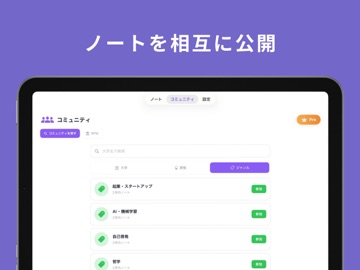
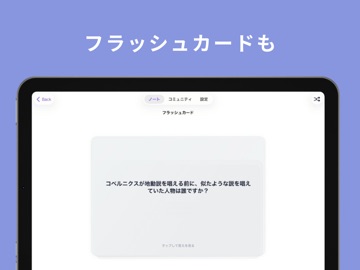
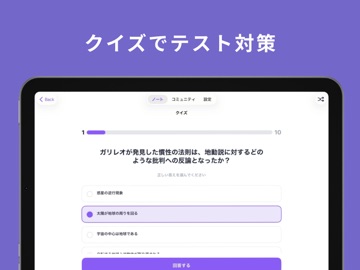
Icon palette
About this app
令和のノート帳 – 授業も勉強も、AIがサポートする新時代のノート帳 わからない問題は撮るだけ。授業は録音するだけ。 授業を録音するだけで、AIが自動で文字起こし&要約。 面倒なノート取りはもう必要ありません。 「令和ノート」は、学生の学びをまるごとサポートするAIノートアプリです。 ◆主な機能 ①AI Tutor – 問題を撮って質問 わからない問題を撮影すると、AIが解き方を順を追って説明。 続けて質問もできるので、その場で疑問を解消できます。 ②授業録音 → 自動文字起こし・要約 講義を録音すると、AIが一瞬でノートに整理。 長時間の授業も、重要ポイントを逃しません。 ③ファイル・リンクのインポート対応 資料やスライドもノートにまとめて保存可能。 参考資料を一括管理できます。 ④AIが自動でフラッシュカード・クイズを生成 ノート内容から自動で復習問題を作成。 テスト前の勉強が劇的に効率化。 ⑤ AIチャットで質問・相談 わからないところはAIにすぐ質問。 授業の疑問をその場で解決できます。 ◆ プレミアムプラン ・…
App details
What you can learn from 令和ノート | AI勉強アプリ
Every shipping app on the App Store has gone through the same decisions you're working through right now: which screenshot goes first, what caption sits over it, which device frame to show, what color the background should be. The 12 screenshots above are 令和ノート | AI勉強アプリ's answers to those questions — they're public, they're real, and they made it through Apple's review.
What the numbers say: 令和ノート | AI勉強アプリ runs a light set with one background colour (#FCFCFC) carried across every screenshot — the listing reads as a single poster when the shots sit side by side in search results. The accent colour we picked up, #7454FC, is the one to reuse for badges, arrows and highlighted words if you borrow this look. Hit Use this style to open the editor with these exact colours and drop your own screenshot in.
Notice the first screenshot in particular. It's the one users see in search results and on the product page, and it's where most apps spend their best caption and tightest design. Look at the proportion of background to phone, where the text sits, what one thing the image is trying to communicate.
Want to see how other Education apps approach the same problem? Browse more Education apps in the showcase.
Take what works into your own screenshots
Open LaunchShots and design your App Store & Google Play screenshots — pick a device frame, drop captions, ship in minutes. Free, in your browser.
Open the screenshot editor →Apps with a similar look
Closest background + accent colours among the listings we've analysed — useful when you want to see the same palette handled by a different team.