Chart position — tracked daily by LaunchShots
Screenshot style breakdown
Sampled from 6 of 씰M2's App Store screenshots — background, accent and theme, measured by LaunchShots (not something Apple publishes).
#7C643C bg
#8E7957
#DC843C accent
#FFFFFF text
Screenshots


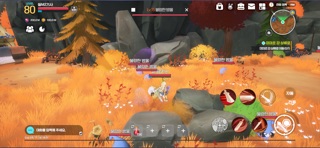

iPad screenshots


Icon palette
About this app
별-걸작 판타지 씰M2! 익살스러운 캐릭터, 밝고 유쾌한 판타지 세계는 그대로, 성장과 전투는 더욱 깊어진 씰감나는 MMORPG, 씰M2! ---------- 【게임특징】 ■ 유쾌함이 살아있는 별-걸작 판타지 개성 넘치는 캐릭터와 몬스터, 밝고 유쾌한 카툰 스타일 RPG 익숙하면서도 새로운 즐거움으로 가득한 쉴츠 대륙을 모험하세요! ■ 개성만점 클래스, 가지각색 전투의 재미! 기사, 광대, 사수, 마법사, 성직자 등 나에게 맞는 클래스를 선택하고 나만의 전투 스타일을 완성하세요! ■ 파티 던전부터 치열한 보스 전투까지 함께하는 파티 던전과 강력한 필드 보스, 그리고 치열한 도전의 전장! 끊임없이 성장하고 도전하고 승리하는 MMORPG의 재미를 경험하세요. ■ 모으고, 키우고, 나만의 방식으로 성장! 장비와 스킬 강화부터 오파츠, 코스튬까지! 다양한 성장 요소를 조합하며 나만의 캐릭터를 만들어 보세요. ■ 함께할수록 더욱 커지는 모험의 재미 친구와 파티를 맺고 길드원과 힘을 합쳐 더 큰 목표에 도전하세요. 함께할수록 더욱 커지는 모험의 재미, 지금 씰…
App details
What you can learn from 씰M2
Every shipping app on the App Store has gone through the same decisions you're working through right now: which screenshot goes first, what caption sits over it, which device frame to show, what color the background should be. The 19 screenshots above are 씰M2's answers to those questions — they're public, they're real, and they made it through Apple's review.
What the numbers say: 씰M2 runs a dark set where the background shifts from screenshot to screenshot (first shot #7C643C) — each image has to stand on its own, so the captions carry more of the story. The accent colour we picked up, #DC843C, is the one to reuse for badges, arrows and highlighted words if you borrow this look. Hit Use this style to open the editor with these exact colours and drop your own screenshot in.
Notice the first screenshot in particular. It's the one users see in search results and on the product page, and it's where most apps spend their best caption and tightest design. Look at the proportion of background to phone, where the text sits, what one thing the image is trying to communicate.
Want to see how other Games apps approach the same problem? Browse more Games apps in the showcase.
Take what works into your own screenshots
Open LaunchShots and design your App Store & Google Play screenshots — pick a device frame, drop captions, ship in minutes. Free, in your browser.
Open the screenshot editor →Apps with a similar look
Closest background + accent colours among the listings we've analysed — useful when you want to see the same palette handled by a different team.