launchshots / showcase / productivity / anyschedule - 공유 캘린더·일정 관리 플래너

AnySchedule - 공유 캘린더·일정 관리 플래너

Productivity ★ 4.6 (2,839) 무료 4+ 119.2 MB

Chart position — tracked daily by LaunchShots

#10 of 100
Top Free Productivity · South Korea
best #2 · 31 days tracked · as of Nov 22
▼ 2 / 7d
#76 of 100
Top Free All Apps · South Korea
best #4 · 15 days tracked · as of Nov 18
▼ 51 / 7d

Screenshot changes — detected by LaunchShots

Sep 25, 2026
AnySchedule - 공유 캘린더·일정 관리 플래너 replaced the screenshot images (same count, theme and layout). →
Sep 17, 2026
AnySchedule - 공유 캘린더·일정 관리 플래너 added 1 iPhone screenshot (6 → 7). →
Aug 25, 2026
AnySchedule - 공유 캘린더·일정 관리 플래너 moved to caption blocks laid over full-bleed screens (was captions above the phone). →

Screenshot style breakdown

Sampled from 6 of AnySchedule - 공유 캘린더·일정 관리 플래너's App Store screenshots — background, accent and theme, measured by LaunchShots (not something Apple publishes).

Use this style →
7 iPhone screenshots · 7 iPad Dark theme Background changes per screenshot
#5C442C bg #725E49 #54847C accent #FFFFFF text
vs. Productivity apps we've analysed (1877): 51% use a light theme — AnySchedule - 공유 캘린더·일정 관리 플래너 goes dark; 39% put the caption above the phone — AnySchedule - 공유 캘린더·일정 관리 플래너 lays a caption block over the screen; the average set has 6.1 screenshots — AnySchedule - 공유 캘린더·일정 관리 플래너 ships 7. Full Productivity benchmark →

Screenshots

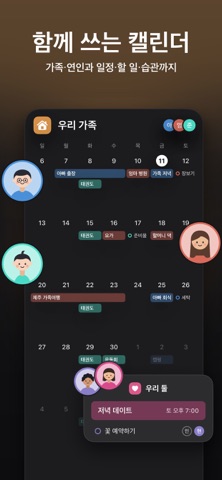
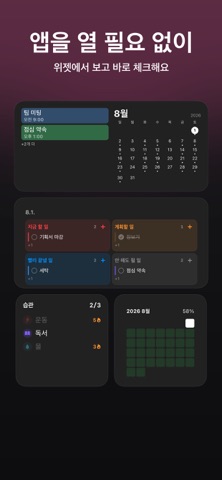
#1 AnySchedule - 공유 캘린더·일정 관리 플래너 iPhone screenshot 1
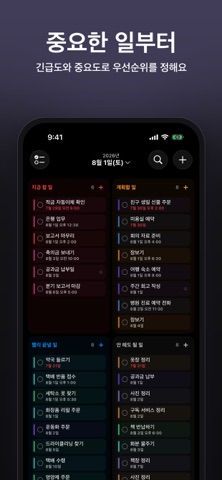
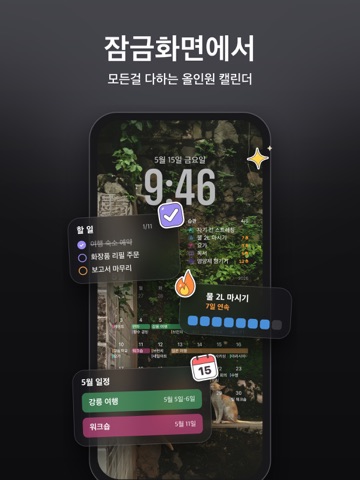
#2 AnySchedule - 공유 캘린더·일정 관리 플래너 iPhone screenshot 2
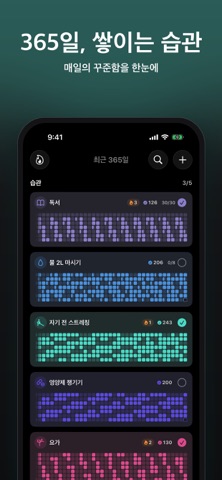
#3 AnySchedule - 공유 캘린더·일정 관리 플래너 iPhone screenshot 3
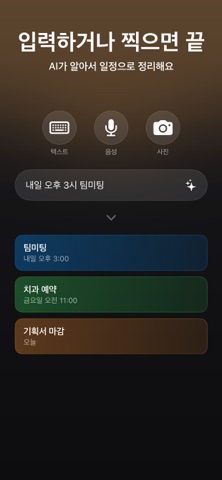
#4 AnySchedule - 공유 캘린더·일정 관리 플래너 iPhone screenshot 4
#5 AnySchedule - 공유 캘린더·일정 관리 플래너 iPhone screenshot 5
#6 AnySchedule - 공유 캘린더·일정 관리 플래너 iPhone screenshot 6
#7 AnySchedule - 공유 캘린더·일정 관리 플래너 iPhone screenshot 7

iPad screenshots

#1 AnySchedule - 공유 캘린더·일정 관리 플래너 iPad screenshot 1
#2 AnySchedule - 공유 캘린더·일정 관리 플래너 iPad screenshot 2
#3 AnySchedule - 공유 캘린더·일정 관리 플래너 iPad screenshot 3
#4 AnySchedule - 공유 캘린더·일정 관리 플래너 iPad screenshot 4
#5 AnySchedule - 공유 캘린더·일정 관리 플래너 iPad screenshot 5
#6 AnySchedule - 공유 캘린더·일정 관리 플래너 iPad screenshot 6
#7 AnySchedule - 공유 캘린더·일정 관리 플래너 iPad screenshot 7

Icon palette

extracting…
Dominant colors sampled from the icon — click any swatch to copy the hex.

About this app

캘린더, 일정, 할일, 습관을 AnySchedule 하나로 관리하세요. 가족·연인·친구와 함께 쓰는 공유 캘린더는 무료예요. 오늘 일정은 잠금화면 배경화면과 위젯에서 바로 보이고, 문장 한 줄·사진 한 장이면 AI가 일정을 대신 등록해 줘요. 함께 쓰는 공유 캘린더 가족·연인·친구와 그룹을 만들어 일정·할일·습관을 함께 써 보세요. 초대 링크나 코드로 참여할 수 있어요. 공유 할일·습관은 누가 완료했는지 보여드려요. 일정에 사진과 파일을 첨부하고, 앨범에서 모아 볼 수 있어요. 생일·기념일은 D-Day로 표시하고 한곳에서 모아 보세요. 인터넷이 느리거나 끊겨도 추가·수정한 내용이 바로 반영돼요. 공유 일정도 잠금화면 배경화면과 위젯에서 확인하세요. 공유 캘린더는 무료로 쓸 수 있어요. 함께 보는 근무 캘린더 근무표 사진을 올리면 근무 일정이 한 번에 등록돼요. 같이 근무하는 날과 함께 쉬는 날을 한눈에 볼 수 있어요. 근무 바꾸기, 근무 통계, 근무 알림도 준비했어요. 오늘 근무는 홈 화면 위젯과 잠금화면에서 확인하세요. 잠금화면 스케줄 배경화…

App details

Bundle ID
com.rele.Scheduler
Latest version
20261117001
Released
Feb 22, 2026
Last updated
Nov 17, 2026
Languages
8 (EN, FR, DE, JA, KO…)
Genres
생산성, 소셜 네트워킹

What you can learn from AnySchedule - 공유 캘린더·일정 관리 플래너

Every shipping app on the App Store has gone through the same decisions you're working through right now: which screenshot goes first, what caption sits over it, which device frame to show, what color the background should be. The 14 screenshots above are AnySchedule - 공유 캘린더·일정 관리 플래너's answers to those questions — they're public, they're real, and they made it through Apple's review.

What the numbers say: AnySchedule - 공유 캘린더·일정 관리 플래너 runs a dark set where the background shifts from screenshot to screenshot (first shot #5C442C) — each image has to stand on its own, so the captions carry more of the story. The accent colour we picked up, #54847C, is the one to reuse for badges, arrows and highlighted words if you borrow this look. Hit Use this style to open the editor with these exact colours and drop your own screenshot in.

Notice the first screenshot in particular. It's the one users see in search results and on the product page, and it's where most apps spend their best caption and tightest design. Look at the proportion of background to phone, where the text sits, what one thing the image is trying to communicate.

Want to see how other Productivity apps approach the same problem? Browse more Productivity apps in the showcase.

Take what works into your own screenshots

Open LaunchShots and design your App Store & Google Play screenshots — pick a device frame, drop captions, ship in minutes. Free, in your browser.

Open the screenshot editor →

Apps with a similar look

Closest background + accent colours among the listings we've analysed — useful when you want to see the same palette handled by a different team.

VeloBank
#5C4434 #649C64
Head Ball 2 - Football Games
#6C4424 #54B464
Global Leadership Summit 2026
#3C3C34 #548494
Ötüken
#3C3C3C #549484
MEDITECH MHealth
#4C4C4C #5C9484
Midi DJ remote lite
#4C4444 #5474A4

More Productivity apps

Latest from the blog

Guides
Configuring Game Center in App Store Connect: Leaderboards and Achievements
Nov 22, 2026
News
Google Play Financial Features Declaration: Avoid Suspensions
Nov 21, 2026
Guides
iOS & Android App Accessibility Guide for Indie Developers
Nov 20, 2026
Tips
Implement Apple AdServices Framework: Zero-SDK Attribution
Nov 19, 2026
1 / 1
copied