Screenshot changes — detected by LaunchShots
Screenshot style breakdown
Sampled from 6 of TCG Crew : Scan & Collection's App Store screenshots — background, accent and theme, measured by LaunchShots (not something Apple publishes).
#0C040C bg
#2E272E
#DC3C3C accent
#FFFFFF text
Reading the caption text from the screenshots in your browser…
Screenshots



Icon palette
About this app
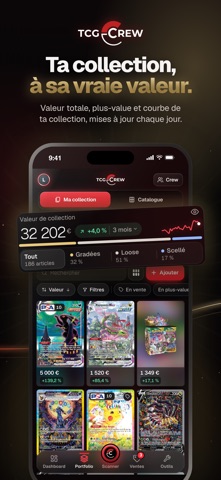
TCG Crew transforme ta collection de cartes en un véritable portefeuille et te donne tous les outils pour la scanner, l'estimer et la vendre. SCANNE, C'EST IDENTIFIÉ Prends une photo : l'IA reconnaît instantanément n'importe quelle carte ou produit scellé en français, anglais, japonais et chinois. Cartes gradées, loose ou scellés, identifiés en quelques secondes. LE JUSTE PRIX, EN TEMPS RÉEL Chaque carte est estimée au prix du marché via CardMarket, eBay et la cote PSA pour les cartes gradées. Tu sais toujours ce que vaut ta collection. TA COLLECTION, SOUS CONTRÔLE • Valeur totale estimée en direct • Suivi carte par carte, doubles et état • Classement de ta collection COMPLÈTE TES MASTERSET Parcours les sets, coche les cartes que tu possèdes, regarde ta progression grandir. Compatible avec Pokémon, Dragon Ball, Riftbound et One Piece — vue grille ou classeur 3×3, filtres par rareté…
App details
What you can learn from TCG Crew : Scan & Collection
Every shipping app on the App Store has gone through the same decisions you're working through right now: which screenshot goes first, what caption sits over it, which device frame to show, what color the background should be. The 8 screenshots above are TCG Crew : Scan & Collection's answers to those questions — they're public, they're real, and they made it through Apple's review.
What the numbers say: TCG Crew : Scan & Collection runs a dark set with one background colour (#0C040C) carried across every screenshot — the listing reads as a single poster when the shots sit side by side in search results. The accent colour we picked up, #DC3C3C, is the one to reuse for badges, arrows and highlighted words if you borrow this look. Hit Use this style to open the editor with these exact colours and drop your own screenshot in.
Notice the first screenshot in particular. It's the one users see in search results and on the product page, and it's where most apps spend their best caption and tightest design. Look at the proportion of background to phone, where the text sits, what one thing the image is trying to communicate.
Want to see how other Reference apps approach the same problem? Browse more Reference apps in the showcase.
Take what works into your own screenshots
Open LaunchShots and design your App Store & Google Play screenshots — pick a device frame, drop captions, ship in minutes. Free, in your browser.
Open the screenshot editor →Apps with a similar look
Closest background + accent colours among the listings we've analysed — useful when you want to see the same palette handled by a different team.