Chart position — tracked daily by LaunchShots
Screenshot changes — detected by LaunchShots
Screenshot style breakdown
Sampled from 6 of KUU - 考えごとが多い人のAIメモアプリ|ADHDにも's App Store screenshots — background, accent and theme, measured by LaunchShots (not something Apple publishes).
#DCECF4 bg
#C1CFD6
#8CBCDC accent
#111111 text
Reading the caption text from the screenshots in your browser…
Screenshots


iPad screenshots




Icon palette
About this app
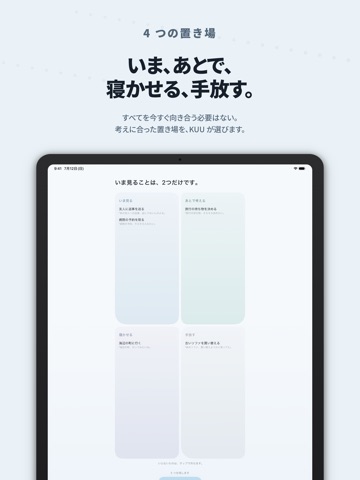
頭の中が、いっぱいのとき。 いま頭にあることを、そのまま話してください。 まとまっていなくて大丈夫です。 KUU は、話したことを少し整えて、 いま見る / あとで考える / 寝かせる / 手放す に分けるアプリです。 最初から整理しようとしなくていい。 すべてを、いま向き合うことにしなくていい。 今は持たなくて大丈夫なものを、KUU がそっと分けます。 ■ こんなとき ・寝る前に頭が冴えて、考えごとが止まらない夜 ・何度も同じことを考えてしまう、ぐるぐる思考のとき ・タスク管理アプリが、圧になっているとき ・誰かに聞いてほしいけど、聞かせたくないとき ・誰かに話すように、自分の頭の中を整理したいとき ・アイデアが浮かんだけど、まだ形にならないとき ・忘れたくないけど、今やることでもないとき ・文字を打つより、声でそのまま残したいとき ・運転中や、料理中など、手が離せないとき ■ 4つの置き場所 ・いま見る — 今、少し目を向けると頭が軽くなりそうなこと ・あとで考える — 今ではなく、別のタイミングで向き合うこと ・寝かせる — …
App details
What you can learn from KUU - 考えごとが多い人のAIメモアプリ|ADHDにも
Every shipping app on the App Store has gone through the same decisions you're working through right now: which screenshot goes first, what caption sits over it, which device frame to show, what color the background should be. The 18 screenshots above are KUU - 考えごとが多い人のAIメモアプリ|ADHDにも's answers to those questions — they're public, they're real, and they made it through Apple's review.
What the numbers say: KUU - 考えごとが多い人のAIメモアプリ|ADHDにも runs a light set with one background colour (#DCECF4) carried across every screenshot — the listing reads as a single poster when the shots sit side by side in search results. The accent colour we picked up, #8CBCDC, is the one to reuse for badges, arrows and highlighted words if you borrow this look. Hit Use this style to open the editor with these exact colours and drop your own screenshot in.
Notice the first screenshot in particular. It's the one users see in search results and on the product page, and it's where most apps spend their best caption and tightest design. Look at the proportion of background to phone, where the text sits, what one thing the image is trying to communicate.
Want to see how other Lifestyle apps approach the same problem? Browse more Lifestyle apps in the showcase.
Take what works into your own screenshots
Open LaunchShots and design your App Store & Google Play screenshots — pick a device frame, drop captions, ship in minutes. Free, in your browser.
Open the screenshot editor →Apps with a similar look
Closest background + accent colours among the listings we've analysed — useful when you want to see the same palette handled by a different team.