Chart position — tracked daily by LaunchShots
Screenshot changes — detected by LaunchShots
Screenshot style breakdown
Sampled from 6 of Ruhun Gıdası: Kur'an-ı Kerim's App Store screenshots — background, accent and theme, measured by LaunchShots (not something Apple publishes).
#0C0C0C bg
#2E2E2E
#1C345C accent
#FFFFFF text
Reading the caption text from the screenshots in your browser…
Screenshots




Icon palette
About this app
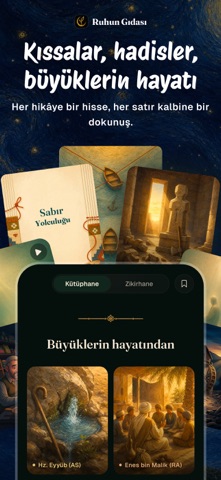
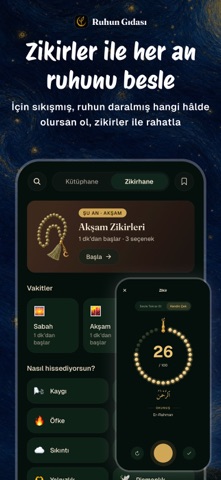
Günlük hayatın koşturmacasında kalbini huzurla dolduracak bir mola ver. Ruhunu beslemek ve içsel huzuru bulmak için günde sadece birkaç dakika yeterli! Ruhun Gıdası, seni yormadan adım adım manevi bir yolculuğa çıkarır; her gün sana iyi gelecek içerikleri keşfetmeni sağlar. UYGULAMADA NELER VAR? Günlük Görevler: Her gün senin için özenle seçilen bir ayet, bir dua ve ilham veren bir kıssayla güne huzurla başla, günü dinginlikle bitir. Namaz Vakti ve Takibi: Bulunduğun bölgeye göre namaz vakitlerini gör, hiçbir vakti kaçırma; beş vaktini her gün tek dokunuşla işaretle kıldığın namazların takibini otomatik yap. Kaza namazların varsa ekle, kıldıkça işaretle ve "Kazaları Bitirme Yolculuğu"nda adım adım huzurla ilerle. Zikirhane: Günlük zikirlerini kolayca takip et. Temel zikirleri öğren, kendi zikir gruplarını oluştur, zikirmatikle sayını tut Duahane: İçinden geçenleri yaz, dualarını kayde…
App details
What you can learn from Ruhun Gıdası: Kur'an-ı Kerim
Every shipping app on the App Store has gone through the same decisions you're working through right now: which screenshot goes first, what caption sits over it, which device frame to show, what color the background should be. The 9 screenshots above are Ruhun Gıdası: Kur'an-ı Kerim's answers to those questions — they're public, they're real, and they made it through Apple's review.
What the numbers say: Ruhun Gıdası: Kur'an-ı Kerim runs a dark set with one background colour (#0C0C0C) carried across every screenshot — the listing reads as a single poster when the shots sit side by side in search results. The accent colour we picked up, #1C345C, is the one to reuse for badges, arrows and highlighted words if you borrow this look. Hit Use this style to open the editor with these exact colours and drop your own screenshot in.
Notice the first screenshot in particular. It's the one users see in search results and on the product page, and it's where most apps spend their best caption and tightest design. Look at the proportion of background to phone, where the text sits, what one thing the image is trying to communicate.
Want to see how other Reference apps approach the same problem? Browse more Reference apps in the showcase.
Take what works into your own screenshots
Open LaunchShots and design your App Store & Google Play screenshots — pick a device frame, drop captions, ship in minutes. Free, in your browser.
Open the screenshot editor →Apps with a similar look
Closest background + accent colours among the listings we've analysed — useful when you want to see the same palette handled by a different team.