Screenshot changes — detected by LaunchShots
Screenshot style breakdown
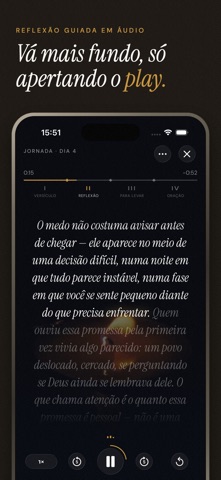
Sampled from 6 of Verso: Versículo e Devocional's App Store screenshots — background, accent and theme, measured by LaunchShots (not something Apple publishes).
#1C1C14 bg
#3B3B34
#746444 accent
#FFFFFF text
Reading the caption text from the screenshots in your browser…
Screenshots



iPad screenshots


Icon palette
About this app
Abra o Verso e o versículo de hoje já está esperando por você — uma passagem escolhida para o dia, colocada na página com o peso que merece. Sem feed pra rolar, sem ruído pra filtrar. Só a palavra de hoje, e um motivo pra voltar amanhã. O Verso trata a escritura como algo que merece ser lido, não só postado: um design editorial, dark mode desde o início, feito para um momento de silêncio. Versículo Diário Uma nova passagem a cada dia, escolhida para você — não um sorteio aleatório. Cada uma com espaço para respirar na página, para que palavras já lidas antes possam soar diferente. Construa uma Sequência Volte todo dia para manter sua sequência de leitura viva. Sem pressão, sem culpa — só um hábito simples que se acumula com o tempo. Planos de Leitura Guiados Vá além de um único dia. Siga planos de leitura guiados, narrados passo a passo e construídos em torno de um tema, uma estação…
App details
What you can learn from Verso: Versículo e Devocional
Every shipping app on the App Store has gone through the same decisions you're working through right now: which screenshot goes first, what caption sits over it, which device frame to show, what color the background should be. The 19 screenshots above are Verso: Versículo e Devocional's answers to those questions — they're public, they're real, and they made it through Apple's review.
What the numbers say: Verso: Versículo e Devocional runs a dark set with one background colour (#1C1C14) carried across every screenshot — the listing reads as a single poster when the shots sit side by side in search results. The accent colour we picked up, #746444, is the one to reuse for badges, arrows and highlighted words if you borrow this look. Hit Use this style to open the editor with these exact colours and drop your own screenshot in.
Notice the first screenshot in particular. It's the one users see in search results and on the product page, and it's where most apps spend their best caption and tightest design. Look at the proportion of background to phone, where the text sits, what one thing the image is trying to communicate.
Want to see how other Reference apps approach the same problem? Browse more Reference apps in the showcase.
Take what works into your own screenshots
Open LaunchShots and design your App Store & Google Play screenshots — pick a device frame, drop captions, ship in minutes. Free, in your browser.
Open the screenshot editor →Apps with a similar look
Closest background + accent colours among the listings we've analysed — useful when you want to see the same palette handled by a different team.