Chart position — tracked daily by LaunchShots
Screenshot style breakdown
Sampled from 6 of 精准导航 - 语音导航.精准定位.智能出行助手's App Store screenshots — background, accent and theme, measured by LaunchShots (not something Apple publishes).
#C4DCFC bg
#ACC1DD
#041C54 accent
#111111 text
Reading the caption text from the screenshots in your browser…
Screenshots




Icon palette
About this app
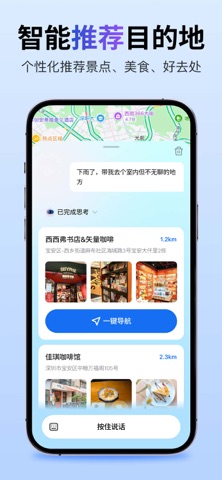
你的AI出行助手 —— 会聊天的导航,懂你的向导。 AI导航,实时定位,语音导航,智能规划路线,出行助手,景点推荐,美食推荐,自驾游,步行导航,旅行攻略。 想去哪,直接说。 精准导航不是普通的导航——它是一个真正会“听”、会“想”、会“推荐”的AI出行伴侣。 -文字/语音对话:像朋友一样聊天,说出你的需求。 -智能推荐目的地:个性化推荐景点、美食、好去处。 -深度目的地介绍:景点、美食、文化,全面了解。 -一键查看全部出行轨迹:你的每一次旅程,都值得被记住。 会聊天的导航,解放双手 打字太麻烦?直接按住说话: -“下了雨,带我去个室内但不无聊的地” → 秒懂你的心情,推荐最合适的去处。 -“介绍一下红旗渠” → 历史、文化、实用信息,娓娓道来。 -“带孩子怎样购买地铁票?” → 连生活小问题都能回答。 -“带我去最近能看日落的地方” → 浪漫目的地,AI帮你找。 就像一个随时在线的本地向导,懂你所想,予你所需。 智能规划路线,轻松探索世界 -智能推荐:根据时间、天气、你的兴趣,推荐景点、餐厅、咖啡馆。 -最优路线:实时路况 + AI算法,避开拥堵,节省时…
App details
What you can learn from 精准导航 - 语音导航.精准定位.智能出行助手
Every shipping app on the App Store has gone through the same decisions you're working through right now: which screenshot goes first, what caption sits over it, which device frame to show, what color the background should be. The 7 screenshots above are 精准导航 - 语音导航.精准定位.智能出行助手's answers to those questions — they're public, they're real, and they made it through Apple's review.
What the numbers say: 精准导航 - 语音导航.精准定位.智能出行助手 runs a light set with one background colour (#C4DCFC) carried across every screenshot — the listing reads as a single poster when the shots sit side by side in search results. The accent colour we picked up, #041C54, is the one to reuse for badges, arrows and highlighted words if you borrow this look. Hit Use this style to open the editor with these exact colours and drop your own screenshot in.
Notice the first screenshot in particular. It's the one users see in search results and on the product page, and it's where most apps spend their best caption and tightest design. Look at the proportion of background to phone, where the text sits, what one thing the image is trying to communicate.
Want to see how other Lifestyle apps approach the same problem? Browse more Lifestyle apps in the showcase.
Take what works into your own screenshots
Open LaunchShots and design your App Store & Google Play screenshots — pick a device frame, drop captions, ship in minutes. Free, in your browser.
Open the screenshot editor →Apps with a similar look
Closest background + accent colours among the listings we've analysed — useful when you want to see the same palette handled by a different team.