Chart position — tracked daily by LaunchShots
Screenshot style breakdown
Sampled from 6 of Dougaku 動画で英語 / 韓国語のシャドーイング学習's App Store screenshots — background, accent and theme, measured by LaunchShots (not something Apple publishes).
#1C94FC bg
#3BA2FC
#045CB4 accent
#FFFFFF text
Screenshots


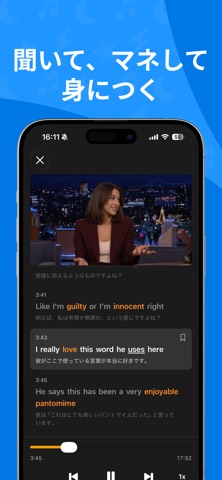


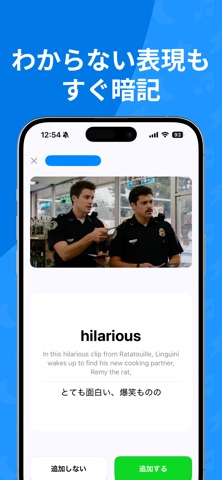
iPad screenshots


Icon palette
About this app
好きな動画が、英語教材になる。 dougakuは、好きな動画を使ってリスニング・英語フレーズや英単語学習ができるアプリです。 海外のインタビュー、スピーチ、英語学習チャンネル、映画紹介、Vlogなど、興味のある動画を使って英語を学べます。 「教科書っぽい英語学習は続かない」 「海外動画なら見ていられる」 そんな方にぴったりの英語学習アプリです。 英語字幕を確認しながら聞く、気になるフレーズを繰り返す、声に出してマネをする。 dougakuなら、動画を見る時間をそのまま英語学習に変えられます。 ■ dougakuでできること ・厳選された動画でネイティブ英語学習 ・英語字幕を見ながらリスニング ・フレーズ単位で聞き直し ・自然な英語表現のインプット ・興味に合わせた動画学習 ・単語のチェックやテスト ・学習成果を可視化 ■ 資格試験の英語学習にも dougakuは、日常英会話だけでなく、TOEIC、IELTS、英検などの資格試験に向けた英語学習にも活用できます。 動画を使ってさまざまな英語に触れることで、リスニング力や語彙力を鍛え、ネイティブの発音…
App details
What you can learn from Dougaku 動画で英語 / 韓国語のシャドーイング学習
Every shipping app on the App Store has gone through the same decisions you're working through right now: which screenshot goes first, what caption sits over it, which device frame to show, what color the background should be. The 11 screenshots above are Dougaku 動画で英語 / 韓国語のシャドーイング学習's answers to those questions — they're public, they're real, and they made it through Apple's review.
What the numbers say: Dougaku 動画で英語 / 韓国語のシャドーイング学習 runs a dark set with one background colour (#1C94FC) carried across every screenshot — the listing reads as a single poster when the shots sit side by side in search results. The accent colour we picked up, #045CB4, is the one to reuse for badges, arrows and highlighted words if you borrow this look. Hit Use this style to open the editor with these exact colours and drop your own screenshot in.
Notice the first screenshot in particular. It's the one users see in search results and on the product page, and it's where most apps spend their best caption and tightest design. Look at the proportion of background to phone, where the text sits, what one thing the image is trying to communicate.
Want to see how other Education apps approach the same problem? Browse more Education apps in the showcase.
Take what works into your own screenshots
Open LaunchShots and design your App Store & Google Play screenshots — pick a device frame, drop captions, ship in minutes. Free, in your browser.
Open the screenshot editor →Apps with a similar look
Closest background + accent colours among the listings we've analysed — useful when you want to see the same palette handled by a different team.