Screenshot style breakdown
Sampled from 6 of StoryNest – Familienaben's App Store screenshots — background, accent and theme, measured by LaunchShots (not something Apple publishes).
#0C0C0C bg
#2E2E2E
#2C7434 accent
#FFFFFF text
Screenshots


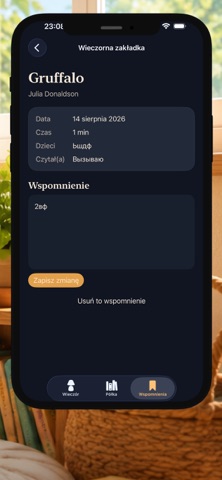
Icon palette
About this app
StoryNest ist ein gemütliches, privates Tagebuch für gemeinsame Vorlesestunden in der Familie. Halten Sie fest, welches Buch Sie Ihrem Kind vorgelesen haben, wie lange der gemeinsame Abend gedauert hat, wer vorgelesen hat und was Ihnen besonders in Erinnerung geblieben ist. Speichern Sie Titel in Ihrem persönlichen Regal, markieren Sie Ihre Favoriten und sehen Sie, welche Geschichten Sie am häufigsten lesen. Der integrierte Katalog klassischer Literatur funktioniert komplett offline. Vorschläge für den nächsten Abend können optional das Alter Ihres Kindes, bereits gelesene Bücher, die Vielfalt der Autoren und die Jahreszeit berücksichtigen. Zu jedem Vorschlag zeigt StoryNest eine kurze Begründung an. Die Empfehlungen werden direkt auf Ihrem Gerät generiert – ohne KI und ohne dass Daten übertragen werden. Während des Lesens ist der Timer als Live-Aktivität auf dem Sperrbildschirm und …
App details
What you can learn from StoryNest – Familienaben
Every shipping app on the App Store has gone through the same decisions you're working through right now: which screenshot goes first, what caption sits over it, which device frame to show, what color the background should be. The 6 screenshots above are StoryNest – Familienaben's answers to those questions — they're public, they're real, and they made it through Apple's review.
What the numbers say: StoryNest – Familienaben runs a mixed light-and-dark set where the background shifts from screenshot to screenshot (first shot #0C0C0C) — each image has to stand on its own, so the captions carry more of the story. The accent colour we picked up, #2C7434, is the one to reuse for badges, arrows and highlighted words if you borrow this look. Hit Use this style to open the editor with these exact colours and drop your own screenshot in.
Notice the first screenshot in particular. It's the one users see in search results and on the product page, and it's where most apps spend their best caption and tightest design. Look at the proportion of background to phone, where the text sits, what one thing the image is trying to communicate.
Want to see how other Book apps approach the same problem? Browse more Book apps in the showcase.
Take what works into your own screenshots
Open LaunchShots and design your App Store & Google Play screenshots — pick a device frame, drop captions, ship in minutes. Free, in your browser.
Open the screenshot editor →Apps with a similar look
Closest background + accent colours among the listings we've analysed — useful when you want to see the same palette handled by a different team.