Screenshot style breakdown
Sampled from 4 of Cute Radar かわいい雨雲レーダー 洗濯とお出かけに's App Store screenshots — background, accent and theme, measured by LaunchShots (not something Apple publishes).
#FCFCFC bg
#DDDDDD
#5C8CB4 accent
#111111 text
Reading the caption text from the screenshots in your browser…
Screenshots


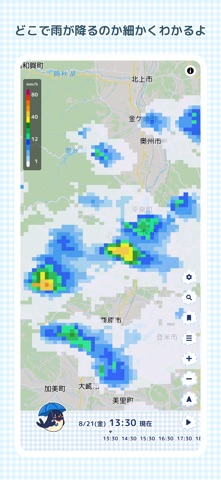

iPad screenshots


Icon palette
About this app
Cute Radar (かわいいレーダー) へようこそ。かわいい雨雲レーダーで、雨雲の動きが見える。 「今から干して大丈夫?」「傘、持たせる?」——迷ったら画面を開くだけ。雨雲がどこにあって、どっちへ動くのかがひと目でわかるよ。 ■ こんなときに ・洗濯物を干す前に。3 秒見れば、外干しか部屋干しか決まるよ ・お昼すぎ、取り込むタイミングもばっちり ・登園・登校の前に。傘を持たせるか、もう迷わない ・買い物や散歩の前に。雨雲が来るまでの時間もわかるね ・会社を出る前に。折りたたみ傘を入れるか、駅まで走るか ・自転車で出かける前に。帰りに降るかどうかもチェック ■ 使い方はかんたん 1. 開くと、最新の雨雲がそのまま 2. 再生ボタンで、雨雲が動き出すよ 3. タイムラインをなぞれば、見たい時刻へジャンプできるよ ■ 見られるもの ・今の雨雲 (実況) と、これから先の雨雲 (予測) ・雨の強さは 14 段階の色。左上の凡例で mm/h がわかるね ・日時表示の「過去」「現在」「予測」で、今どこを見ているか迷わない ■ レーダーだけに絞ったよ 週間予報も…
App details
What you can learn from Cute Radar かわいい雨雲レーダー 洗濯とお出かけに
Every shipping app on the App Store has gone through the same decisions you're working through right now: which screenshot goes first, what caption sits over it, which device frame to show, what color the background should be. The 8 screenshots above are Cute Radar かわいい雨雲レーダー 洗濯とお出かけに's answers to those questions — they're public, they're real, and they made it through Apple's review.
What the numbers say: Cute Radar かわいい雨雲レーダー 洗濯とお出かけに runs a light set with one background colour (#FCFCFC) carried across every screenshot — the listing reads as a single poster when the shots sit side by side in search results. The accent colour we picked up, #5C8CB4, is the one to reuse for badges, arrows and highlighted words if you borrow this look. Hit Use this style to open the editor with these exact colours and drop your own screenshot in.
Notice the first screenshot in particular. It's the one users see in search results and on the product page, and it's where most apps spend their best caption and tightest design. Look at the proportion of background to phone, where the text sits, what one thing the image is trying to communicate.
Want to see how other Weather apps approach the same problem? Browse more Weather apps in the showcase.
Take what works into your own screenshots
Open LaunchShots and design your App Store & Google Play screenshots — pick a device frame, drop captions, ship in minutes. Free, in your browser.
Open the screenshot editor →Apps with a similar look
Closest background + accent colours among the listings we've analysed — useful when you want to see the same palette handled by a different team.