Chart position — tracked daily by LaunchShots
Screenshot style breakdown
Sampled from 6 of تعارف ودردشة صوتية : خليج شات's App Store screenshots — background, accent and theme, measured by LaunchShots (not something Apple publishes).
#0C1424 bg
#2E3442
#148C84 accent
#FFFFFF text
Screenshots


iPad screenshots


Icon palette
About this app
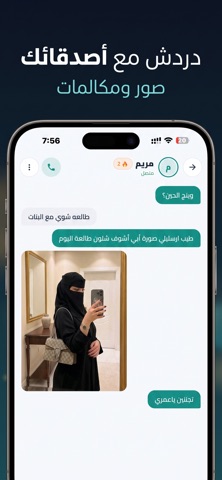
في خليج شات لا تبدأ المحادثة من فراغ. قبل أي دردشة، تلعب أنت والطرف الآخر جولة توافق: خمسة أسئلة سريعة، كل واحد يختار إجابته دون أن يرى إجابة الآخر. في النهاية تظهر نسبة توافقكما والنقاط التي اتفقتما عليها، ثم تُفتح المحادثة. الفكرة بسيطة: أن تعرف شيئاً عن الشخص قبل أول كلمة. كيف يعمل اختر اهتماماتك واضغط بحث. نوصلك بشخص يشاركك اهتماماتك، فتظهر لك بطاقته ومعرّفه وتقرران معاً إن كنتما تريدان المتابعة. بعد موافقتكما تبدأ جولة التوافق، وعند انتهائها تُفتح المحادثة مباشرة. داخل المحادثة رسائل نصية وصور ومقاطع صوتية. أعجبك الحديث؟ أضف الشخص إلى قائمة أصدقائك وأكملا في أي وقت. المكالمات الصوتية متاحة بين الأصدقاء فقط، ويمكنك إيقاف استقبال المكالمات تماماً من الإعدادات متى شئت. سلسلة الأيام كل يوم تدخل فيه تزيد سلسلتك، وتفتح شارات جديدة كلما تقدمت. اشتراك مميز فلتر الجنس بلا حد يومي. تجربة خالية من الإعلانات. مكالمات تصل إلى ساعة كاملة وبلا حدود. شارة مميز الذهبية بجانب اسمك. حد أصد…
App details
What you can learn from تعارف ودردشة صوتية : خليج شات
Every shipping app on the App Store has gone through the same decisions you're working through right now: which screenshot goes first, what caption sits over it, which device frame to show, what color the background should be. The 13 screenshots above are تعارف ودردشة صوتية : خليج شات's answers to those questions — they're public, they're real, and they made it through Apple's review.
What the numbers say: تعارف ودردشة صوتية : خليج شات runs a mixed light-and-dark set where the background shifts from screenshot to screenshot (first shot #0C1424) — each image has to stand on its own, so the captions carry more of the story. The accent colour we picked up, #148C84, is the one to reuse for badges, arrows and highlighted words if you borrow this look. Hit Use this style to open the editor with these exact colours and drop your own screenshot in.
Notice the first screenshot in particular. It's the one users see in search results and on the product page, and it's where most apps spend their best caption and tightest design. Look at the proportion of background to phone, where the text sits, what one thing the image is trying to communicate.
Want to see how other Social Networking apps approach the same problem? Browse more Social Networking apps in the showcase.
Take what works into your own screenshots
Open LaunchShots and design your App Store & Google Play screenshots — pick a device frame, drop captions, ship in minutes. Free, in your browser.
Open the screenshot editor →Apps with a similar look
Closest background + accent colours among the listings we've analysed — useful when you want to see the same palette handled by a different team.