Screenshot changes — detected by LaunchShots
Screenshot style breakdown
Sampled from 6 of ブンブン伝説|バイクのコールアプリ's App Store screenshots — background, accent and theme, measured by LaunchShots (not something Apple publishes).
#0C0C14 bg
#2E2E34
#343C64 accent
#FFFFFF text
Reading the caption text from the screenshots in your browser…
Screenshots



Icon palette
About this app
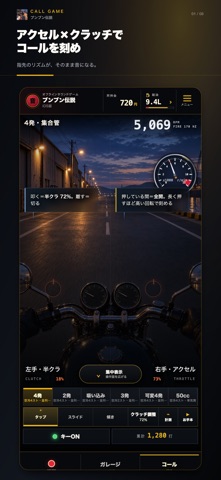
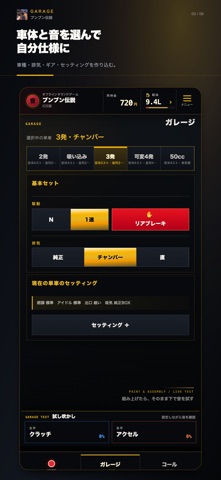
単車の「コール」を、アクセルとクラッチで自分の音にする。 『ブンブン伝説』は、iPhoneで遊べるバイクのコールアプリです。アクセルを回す、回転を落とす、クラッチをつなぐ。両手のタイミングで音の表情が変わります。 ■ アクセルとクラッチで鳴らす 録音を再生するだけではなく、操作のタイミングに合わせて音が変化します。自由に音を刻み、自分のコールを作れます。 ■ 自分に合った操作で遊ぶ 画面をタップする操作、指を滑らせるスライド操作、端末の傾きを使う操作に対応。設定を調整しながら、自分に合う操作を選べます。 ■ 車体と音を選ぶ 車体や音の組み合わせを選んで、自分好みのスタイルで遊べます。 ■ 基本リズムを練習する お手本のリズムを聞きながら、アクセルとクラッチのタイミングを試せます。練習を使わず、自由に鳴らすこともできます。 ■ プレイ動画を録画・共有 ゲーム内の映像とエンジン音を最大60秒の縦動画にできます。完成した動画をアプリ内で確認し、写真アプリへ保存するか、iOSの共有画面からファイルやSNSなどの共有先を選べ…
App details
What you can learn from ブンブン伝説|バイクのコールアプリ
Every shipping app on the App Store has gone through the same decisions you're working through right now: which screenshot goes first, what caption sits over it, which device frame to show, what color the background should be. The 8 screenshots above are ブンブン伝説|バイクのコールアプリ's answers to those questions — they're public, they're real, and they made it through Apple's review.
What the numbers say: ブンブン伝説|バイクのコールアプリ runs a dark set with one background colour (#0C0C14) carried across every screenshot — the listing reads as a single poster when the shots sit side by side in search results. The accent colour we picked up, #343C64, is the one to reuse for badges, arrows and highlighted words if you borrow this look. Hit Use this style to open the editor with these exact colours and drop your own screenshot in.
Notice the first screenshot in particular. It's the one users see in search results and on the product page, and it's where most apps spend their best caption and tightest design. Look at the proportion of background to phone, where the text sits, what one thing the image is trying to communicate.
Want to see how other Games apps approach the same problem? Browse more Games apps in the showcase.
Take what works into your own screenshots
Open LaunchShots and design your App Store & Google Play screenshots — pick a device frame, drop captions, ship in minutes. Free, in your browser.
Open the screenshot editor →Apps with a similar look
Closest background + accent colours among the listings we've analysed — useful when you want to see the same palette handled by a different team.