Chart position — tracked daily by LaunchShots
Screenshot style breakdown
Sampled from 5 of Hmm - 言葉をしらべる・記録する・振り返る's App Store screenshots — background, accent and theme, measured by LaunchShots (not something Apple publishes).
#F4F4F4 bg
#D6D6D6
#5CAC6C accent
#111111 text
Reading the caption text from the screenshots in your browser…
Screenshots



Icon palette
About this app
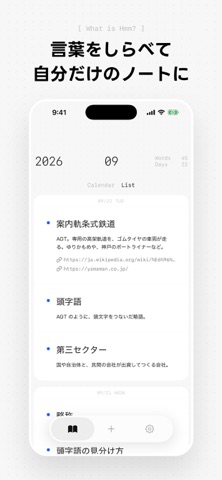
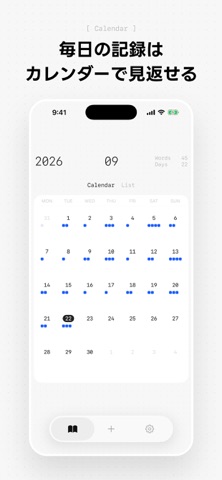
気になった言葉を毎日メモして育てる。 Hmm(フムー)は、言葉をしらべて、記録して、見返せる、自分らしい言葉をあつめるためのノートです。 ■ こんなときにおすすめ ・水族館や博物館で見つけた、知らない言葉を書きとめたい ・今日出会った言葉を、寝る前に振り返りたい ・毎日ひとつ、言葉を集める習慣をつくりたい ・自分らしい言葉をあつめるノートがほしい ■ すぐにメモして、いつでも学べる 言葉を入力したら、その場でGoogleやWikipediaで検索できます。ChatGPTやClaudeに聞きたいときもスムーズ。言葉とメモをコピーして、それぞれのサービスを開くことができます。 ■ 主な機能 ・言葉・メモ・URLを記録 ・カレンダー表示で、言葉の数を振り返る ・リスト表示で、言葉を一気に見返す ・検索機能で、思い出したい言葉を絞り込み ・データをMarkdown形式でエクスポート ぜひ、あなただけの言葉を集めてみてください。 -- ■利用規約: https://hmm-eight-mu.vercel.app/terms
App details
What you can learn from Hmm - 言葉をしらべる・記録する・振り返る
Every shipping app on the App Store has gone through the same decisions you're working through right now: which screenshot goes first, what caption sits over it, which device frame to show, what color the background should be. The 5 screenshots above are Hmm - 言葉をしらべる・記録する・振り返る's answers to those questions — they're public, they're real, and they made it through Apple's review.
What the numbers say: Hmm - 言葉をしらべる・記録する・振り返る runs a light set with one background colour (#F4F4F4) carried across every screenshot — the listing reads as a single poster when the shots sit side by side in search results. The accent colour we picked up, #5CAC6C, is the one to reuse for badges, arrows and highlighted words if you borrow this look. Hit Use this style to open the editor with these exact colours and drop your own screenshot in.
Notice the first screenshot in particular. It's the one users see in search results and on the product page, and it's where most apps spend their best caption and tightest design. Look at the proportion of background to phone, where the text sits, what one thing the image is trying to communicate.
Want to see how other Reference apps approach the same problem? Browse more Reference apps in the showcase.
Take what works into your own screenshots
Open LaunchShots and design your App Store & Google Play screenshots — pick a device frame, drop captions, ship in minutes. Free, in your browser.
Open the screenshot editor →Apps with a similar look
Closest background + accent colours among the listings we've analysed — useful when you want to see the same palette handled by a different team.