Chart position — tracked daily by LaunchShots
Screenshot style breakdown
Sampled from 6 of スタラボ 赤シート・写真から単語帳|一問一答・あんき's App Store screenshots — background, accent and theme, measured by LaunchShots (not something Apple publishes).
#FCFCFC bg
#DDDDDD
#24B4FC accent
#111111 text
Screenshots


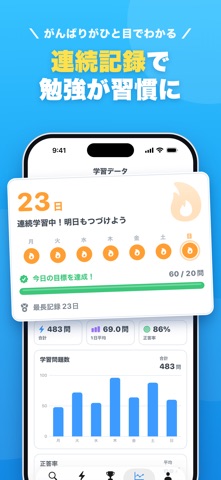

iPad screenshots


Icon palette
About this app
暗記を、ゲームみたいに楽しく。毎日5分で、ちゃんと覚えられる。 スタラボは、暗記帳で英単語・英熟語・英文法・数学の公式・歴史・理科などを学べる暗記アプリです。 ■ すぐに使える暗記帳 TOEIC・英検・中学英語・大学入試の英単語や英熟語※、英文法※、数学の公式、歴史、物理・化学、地理・都道府県など、92冊の暗記帳を収録。 ■ いろいろな学び方 赤シート※、4択クイズ、フリック、タイピング、手書き※、リスニング※で、同じ暗記帳をくり返し学べます。 ■ 自分だけの暗記帳を作れる 問題と答えを入力するだけで暗記帳を作れます。ノートや教科書を撮影すれば、AIが問題を作ります。 ■ みんなの暗記帳をさがす ほかのユーザーが公開した暗記帳を検索して学習できます。自分の暗記帳を公開・シェアすることもできます。 ■ 続けられるしくみ 1日の目標、連続学習日数、ランキング、学習リマインダー、ロック画面で覚えられるカルタ※で、毎日の学習が続きます。 ■ プレミアム(有料)について ※の付いた機能・暗記帳(英熟語・英文法の暗記帳、赤シート・手書…
App details
What you can learn from スタラボ 赤シート・写真から単語帳|一問一答・あんき
Every shipping app on the App Store has gone through the same decisions you're working through right now: which screenshot goes first, what caption sits over it, which device frame to show, what color the background should be. The 17 screenshots above are スタラボ 赤シート・写真から単語帳|一問一答・あんき's answers to those questions — they're public, they're real, and they made it through Apple's review.
What the numbers say: スタラボ 赤シート・写真から単語帳|一問一答・あんき runs a light set where the background shifts from screenshot to screenshot (first shot #FCFCFC) — each image has to stand on its own, so the captions carry more of the story. The accent colour we picked up, #24B4FC, is the one to reuse for badges, arrows and highlighted words if you borrow this look. Hit Use this style to open the editor with these exact colours and drop your own screenshot in.
Notice the first screenshot in particular. It's the one users see in search results and on the product page, and it's where most apps spend their best caption and tightest design. Look at the proportion of background to phone, where the text sits, what one thing the image is trying to communicate.
Want to see how other Education apps approach the same problem? Browse more Education apps in the showcase.
Take what works into your own screenshots
Open LaunchShots and design your App Store & Google Play screenshots — pick a device frame, drop captions, ship in minutes. Free, in your browser.
Open the screenshot editor →Apps with a similar look
Closest background + accent colours among the listings we've analysed — useful when you want to see the same palette handled by a different team.