Chart position — tracked daily by LaunchShots
Screenshot style breakdown
Sampled from 5 of テレビ番組表日本:日本のテレビ番組表(JP)'s App Store screenshots — background, accent and theme, measured by LaunchShots (not something Apple publishes).
#040404 bg
#272727
#CC0414 accent
#FFFFFF text
Screenshots


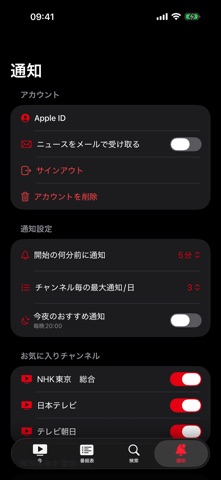

iPad screenshots


Icon palette
About this app
日本のテレビ番組表では、すべてのあなたの好きな日本のテ レビチャンネルのテレビ番組を視聴することができます。 アプリの詳細: •ライブ配信:主要局の公式ニュースライブをワンタップで視聴。 •無線LAN、5G、4G上で動作。 •日本国内、または海外でもご利用可能。 •最新の iOS に対応・最適化済み。 •TVプログラムが自動的に更新される。 •アカウント登録不要、すぐにご利用いただけます(Sign in with Apple 任意)。 •アプリすぐに機能的かつ自由。 •タブが速く相談が可能になり、お気に入りのチャンネルに捧 げ! •アラームを設定する機能は、お気に入りのプログラムの開始 を通知する。 •ホーム画面ウィジェットで、今放送中の番組をひと目で確認。 •Dynamic Island のライブアクティビティで番組の進行をリ アルタイム表示(iPhone 14 Pro 以降)。 •Spotlight 検索からも番組を直接発見可能。 •日本語に翻訳。 •ライト/ダークテーマに対応(システム設定に自動で追従)。 The Japanese TV-listings …
App details
What you can learn from テレビ番組表日本:日本のテレビ番組表(JP)
Every shipping app on the App Store has gone through the same decisions you're working through right now: which screenshot goes first, what caption sits over it, which device frame to show, what color the background should be. The 10 screenshots above are テレビ番組表日本:日本のテレビ番組表(JP)'s answers to those questions — they're public, they're real, and they made it through Apple's review.
What the numbers say: テレビ番組表日本:日本のテレビ番組表(JP) runs a dark set where the background shifts from screenshot to screenshot (first shot #040404) — each image has to stand on its own, so the captions carry more of the story. The accent colour we picked up, #CC0414, is the one to reuse for badges, arrows and highlighted words if you borrow this look. Hit Use this style to open the editor with these exact colours and drop your own screenshot in.
Notice the first screenshot in particular. It's the one users see in search results and on the product page, and it's where most apps spend their best caption and tightest design. Look at the proportion of background to phone, where the text sits, what one thing the image is trying to communicate.
Want to see how other News apps approach the same problem? Browse more News apps in the showcase.
Take what works into your own screenshots
Open LaunchShots and design your App Store & Google Play screenshots — pick a device frame, drop captions, ship in minutes. Free, in your browser.
Open the screenshot editor →Apps with a similar look
Closest background + accent colours among the listings we've analysed — useful when you want to see the same palette handled by a different team.