launchshots / showcase / graphics & design / da vinci eye: ar trace & draw

Da Vinci Eye: AR Trace & Draw

Graphics & Design ★ 4.6 (11,672) Free 12+ 220.8 MB

Chart position — tracked daily by LaunchShots

#43 of 100
Top Free Graphics & Design · Spain
best #40 · 11 days tracked · as of Sep 29
▲ 20 / 7d
#46 of 100
Top Free Graphics & Design · Canada
best #29 · 11 days tracked · as of Sep 28
▲ 8 / 7d
#49 of 100
Top Free Graphics & Design · South Korea
best #49 · 9 days tracked · as of Sep 28
▲ 38 / 7d
#50 of 100
Top Free Graphics & Design · Australia
best #27 · 11 days tracked · as of Sep 25
▲ 6 / 7d
#58 of 100
Top Free Graphics & Design · Mexico
best #50 · 11 days tracked · as of Sep 29
▼ 6 / 7d
+ 17 more charts

Screenshot changes — detected by LaunchShots

Sep 30, 2026
Da Vinci Eye: AR Trace & Draw added 2 iPhone screenshots (8 → 10); switched from a mixed to a light theme; moved to captions above the phone (was full-bleed screens without captions); changed the accent colour from #8C644C to #CC8C7C; unified every screenshot on one background colour. →

Screenshot style breakdown

Sampled from 6 of Da Vinci Eye: AR Trace & Draw's App Store screenshots — background, accent and theme, measured by LaunchShots (not something Apple publishes).

Use this style →
10 iPhone screenshots · 10 iPad Light theme One background colour across the set
#FCFCFC bg #DDDDDD #CC8C7C accent #111111 text

Reading the caption text from the screenshots in your browser…

vs. Graphics & Design apps we've analysed (991): 44% use a light theme — so does Da Vinci Eye: AR Trace & Draw; 42% put the caption above the phone (same here); the average set has 6.4 screenshots — Da Vinci Eye: AR Trace & Draw ships 10. Full Graphics & Design benchmark →

Screenshots

#1 Da Vinci Eye: AR Trace & Draw iPhone screenshot 1
#2 Da Vinci Eye: AR Trace & Draw iPhone screenshot 2
#3 Da Vinci Eye: AR Trace & Draw iPhone screenshot 3
#4 Da Vinci Eye: AR Trace & Draw iPhone screenshot 4
#5 Da Vinci Eye: AR Trace & Draw iPhone screenshot 5
#6 Da Vinci Eye: AR Trace & Draw iPhone screenshot 6
#7 Da Vinci Eye: AR Trace & Draw iPhone screenshot 7
#8 Da Vinci Eye: AR Trace & Draw iPhone screenshot 8
#9 Da Vinci Eye: AR Trace & Draw iPhone screenshot 9
#10 Da Vinci Eye: AR Trace & Draw iPhone screenshot 10

iPad screenshots

#1 Da Vinci Eye: AR Trace & Draw iPad screenshot 1
#2 Da Vinci Eye: AR Trace & Draw iPad screenshot 2
#3 Da Vinci Eye: AR Trace & Draw iPad screenshot 3
#4 Da Vinci Eye: AR Trace & Draw iPad screenshot 4
#5 Da Vinci Eye: AR Trace & Draw iPad screenshot 5
#6 Da Vinci Eye: AR Trace & Draw iPad screenshot 6
#7 Da Vinci Eye: AR Trace & Draw iPad screenshot 7
#8 Da Vinci Eye: AR Trace & Draw iPad screenshot 8
#9 Da Vinci Eye: AR Trace & Draw iPad screenshot 9
#10 Da Vinci Eye: AR Trace & Draw iPad screenshot 10

Icon palette

extracting…
Dominant colors sampled from the icon — click any swatch to copy the hex.

About this app

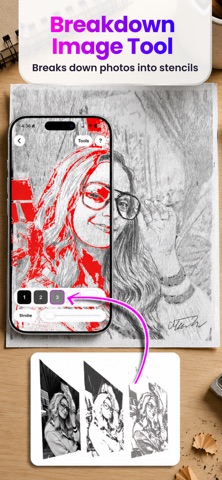
As seen on Shark Tank and featured in Apple's Apps We Love, Watercolor Artist Magazine, Handmade Seller Magazine, LifeHacker, MakeUseOf, Fast Company (Innovation Award winner), Apple News and more! Da Vinci Eye is used by millions of creatives from painters to bakers to make incredible artwork. The app is not just for tracing, it offers a wide range of drawing tools, lessons, daily drawing prompts, and a supportive community to share your artwork! IMPORTANT!: Please read how this app works below and the device requirements for AR Mode BEFORE purchasing. HIGHLIGHTS • Create incredible artwork from your own photos • Make hyper-realistic drawings with our strobe feature • Record time-lapse videos of your drawings • Separate images into layers by color value, then view those areas on your canvas • Easily learn the fundamentals of drawing • Breakdown any image into step-by-step instructi…

App details

Bundle ID
com.cumbemg.davinci
Latest version
5.0.1
Released
Jun 16, 2016
Last updated
Sep 28, 2026
Languages
11 (AR, EN, FR, DE, HI…)
Genres
Graphics & Design, Education

What you can learn from Da Vinci Eye: AR Trace & Draw

Every shipping app on the App Store has gone through the same decisions you're working through right now: which screenshot goes first, what caption sits over it, which device frame to show, what color the background should be. The 20 screenshots above are Da Vinci Eye: AR Trace & Draw's answers to those questions — they're public, they're real, and they made it through Apple's review.

What the numbers say: Da Vinci Eye: AR Trace & Draw runs a light set with one background colour (#FCFCFC) carried across every screenshot — the listing reads as a single poster when the shots sit side by side in search results. The accent colour we picked up, #CC8C7C, is the one to reuse for badges, arrows and highlighted words if you borrow this look. Hit Use this style to open the editor with these exact colours and drop your own screenshot in.

Notice the first screenshot in particular. It's the one users see in search results and on the product page, and it's where most apps spend their best caption and tightest design. Look at the proportion of background to phone, where the text sits, what one thing the image is trying to communicate.

Want to see how other Graphics & Design apps approach the same problem? Browse more Graphics & Design apps in the showcase.

Take what works into your own screenshots

Open LaunchShots and design your App Store & Google Play screenshots — pick a device frame, drop captions, ship in minutes. Free, in your browser.

Open the screenshot editor →

Apps with a similar look

Closest background + accent colours among the listings we've analysed — useful when you want to see the same palette handled by a different team.

magicplan
#FCFCFC #CC8C74
Casa AI Home & Interior Design
#FCFCFC #C48C7C
Apprenez le Portugais - Novice
#FCFCFC #C48C7C
The Fragrance Shop - TFS App
#FCFCFC #C48C7C
구해줄거냥? : 고양이 마을 퍼즐
#FCFCFC #CC9474
FindClo
#FCFCFC #C4947C

More Graphics & Design apps

Latest from the blog

Guides
Landscape Screenshots for Games: Rules, Captions, & Order
Sep 29, 2026
Tips
Dark Mode Screenshots: When They Boost App Installs, When They Don't
Sep 28, 2026
Guides
App Store Screenshot Rejection: Alpha Channels, sRGB, & PNG Gotchas
Sep 27, 2026
Build in public
Solo Dev's Guide: Building in Public Without Burnout
Sep 26, 2026
1 / 1
copied