Chart position — tracked daily by LaunchShots
Screenshot style breakdown
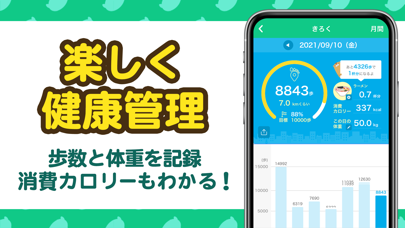
Sampled from 5 of aruku&(あるくと) 歩いてポイントが貯まる歩数計アプリ's App Store screenshots — background, accent and theme, measured by LaunchShots (not something Apple publishes).
#FCFCFC bg
#DDDDDD
#14CC84 accent
#111111 text
Reading the caption text from the screenshots in your browser…
Screenshots




Icon palette
About this app
aruku&(あるくと)は、歩いてポイントが貯まるウォーキングアプリです。 条件達成で地域名産品やコンビニ賞品などにも応募できます。 随時、おすすめの人気賞品が追加されるので、こまめに賞品をチェックしよう! ◆こんな人におすすめ!歩数計アプリ aruku&(あるくと) ・歩数を毎日記録したい ・歩くだけでポイントが貯まる無料のポイ活アプリを探している ・歩いて賞品に応募できるアプリを探している ・歩数や歩いた距離、消費カロリーを確認できる歩数計(ほすうけい)/万歩計(まんぽけい)を探している ・健康のために歩く習慣を身に着けたい ・体重記録や体重管理を記録できる、健康管理アプリ、ヘルスケアアプリを探している ・ウォーキングや散歩が続かない ・ゲーム感覚でウォーキングを楽しみたい ・家族や友達と一緒に歩数計アプリで歩数を記録したい ・駅から会社までの距離が遠いので、毎日の通勤を歩数計アプリで楽しくしたい ・おすすめのウォーキングコースを楽しく歩きたい ・毎日たくさん歩くので歩いてポイントを貯めたい ・キャラクターを集めるのが…
App details
What you can learn from aruku&(あるくと) 歩いてポイントが貯まる歩数計アプリ
Every shipping app on the App Store has gone through the same decisions you're working through right now: which screenshot goes first, what caption sits over it, which device frame to show, what color the background should be. The 5 screenshots above are aruku&(あるくと) 歩いてポイントが貯まる歩数計アプリ's answers to those questions — they're public, they're real, and they made it through Apple's review.
What the numbers say: aruku&(あるくと) 歩いてポイントが貯まる歩数計アプリ runs a light set with one background colour (#FCFCFC) carried across every screenshot — the listing reads as a single poster when the shots sit side by side in search results. The accent colour we picked up, #14CC84, is the one to reuse for badges, arrows and highlighted words if you borrow this look. Hit Use this style to open the editor with these exact colours and drop your own screenshot in.
Notice the first screenshot in particular. It's the one users see in search results and on the product page, and it's where most apps spend their best caption and tightest design. Look at the proportion of background to phone, where the text sits, what one thing the image is trying to communicate.
Want to see how other Health & Fitness apps approach the same problem? Browse more Health & Fitness apps in the showcase.
Take what works into your own screenshots
Open LaunchShots and design your App Store & Google Play screenshots — pick a device frame, drop captions, ship in minutes. Free, in your browser.
Open the screenshot editor →Apps with a similar look
Closest background + accent colours among the listings we've analysed — useful when you want to see the same palette handled by a different team.