launchshots / showcase / shopping / farfetch发发奇

FARFETCH发发奇

Shopping ★ 4.8 (51,531) 免费 4+ 125.6 MB

Chart position — tracked daily by LaunchShots

#70 of 100
Top Free Shopping · China
best #70 · 9 days tracked · as of Nov 22
▲ 12 / 7d

Screenshot changes — detected by LaunchShots

Nov 19, 2026
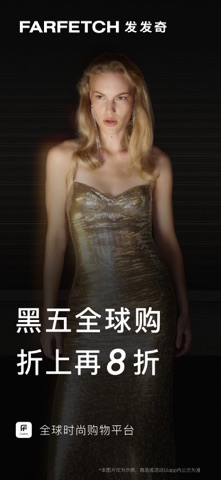
FARFETCH发发奇 switched from a light to a mixed theme; moved to captions below the phone (was captions above the phone); changed the background colour from #8CACC4 to #0C0C0C. →
Nov 12, 2026
FARFETCH发发奇 added 1 iPhone screenshot (5 → 6); switched from a mixed to a light theme; changed the background colour from #342C24 to #8CACC4; changed the accent colour from #8C543C to #4C1C1C. →
Oct 28, 2026
FARFETCH发发奇 replaced the screenshot images (same count, theme and layout). →
Oct 11, 2026
FARFETCH发发奇 replaced the screenshot images (same count, theme and layout). →
Oct 2, 2026
FARFETCH发发奇 removed 1 iPhone screenshot (6 → 5); moved to captions above the phone (was captions below the phone); changed the accent colour from #6494C4 to #8C543C. →
Sep 12, 2026
FARFETCH发发奇 changed the background colour from #B47444 to #3C3C34; changed the accent colour from #5C3C24 to #6494C4. →
Aug 27, 2026
FARFETCH发发奇 switched from a light to a mixed theme; changed the background colour from #F4ACBC to #B47444; changed the accent colour from #BC845C to #5C3C24. →

Screenshot style breakdown

Sampled from 6 of FARFETCH发发奇's App Store screenshots — background, accent and theme, measured by LaunchShots (not something Apple publishes).

Use this style →
6 iPhone screenshots · 6 iPad Mixed light / dark Background changes per screenshot
#0C0C0C bg #2E2E2E #6C543C accent #FFFFFF text

Reading the caption text from the screenshots in your browser…

vs. Shopping apps we've analysed (2983): 48% use a light theme; 41% put the caption above the phone — FARFETCH发发奇 puts it below; the average set has 6.1 screenshots. Full Shopping benchmark →

Screenshots

#1 FARFETCH发发奇 iPhone screenshot 1
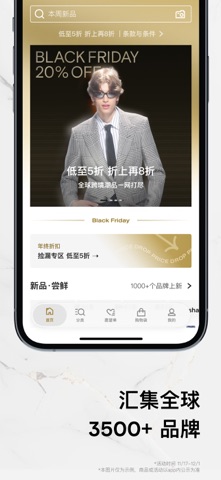
#2 FARFETCH发发奇 iPhone screenshot 2
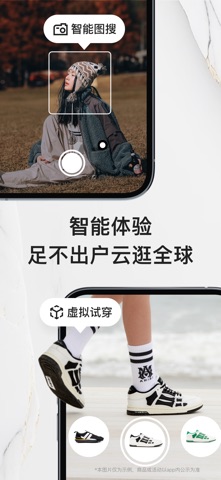
#3 FARFETCH发发奇 iPhone screenshot 3
#4 FARFETCH发发奇 iPhone screenshot 4
#5 FARFETCH发发奇 iPhone screenshot 5
#6 FARFETCH发发奇 iPhone screenshot 6

iPad screenshots

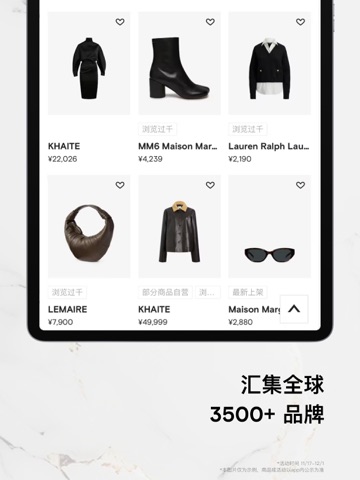
#1 FARFETCH发发奇 iPad screenshot 1
#2 FARFETCH发发奇 iPad screenshot 2
#3 FARFETCH发发奇 iPad screenshot 3
#4 FARFETCH发发奇 iPad screenshot 4
#5 FARFETCH发发奇 iPad screenshot 5
#6 FARFETCH发发奇 iPad screenshot 6

Icon palette

extracting…
Dominant colors sampled from the icon — click any swatch to copy the hex.

About this app

「FARFETCH 发发奇」是全球领先的时尚购物平台,旨在将品牌、买手店与时尚爱好者紧密连结。 【全球海量单品】 热搜尖货实时网罗,经典大牌、新锐设计师品牌、小众品牌,3500+品牌一键解锁。 【正品保证跨境直邮】 签约50多个国家、1400个品牌直供知名买手店和高端百货的正品货源,完善身份信息,立享极速清关,心仪商品一触即发,足不出户即可云逛全球。 【支持跨境退货】 30天内可预约上门取货、退货,货款、进口关税一并退还,让您畅购无忧。 【Access会员权益】 独特的会员体验,注册即享受会员福利,升级尊享贵宾,更享1对1时尚顾问服务。 【时尚权威】 发现海量单品、发掘无限风格、奇遇多元人设,专业时尚团队每周推荐潮流趋势、时尚达人推荐穿搭风向标、品牌故事甄选宝藏、品牌发音在线答疑。 【便捷支付】 支持国内所有主流支付方式,包括银行卡、微信支付、支付宝等。 【先人一步】 新品专区每周上线30000+时尚单品,在FARFETCH,总有新品待您探索。 【丰富产品体验】 时尚超榜风云纵览,好价专区品质优选,Discovery发现灵感,还有挚友FIFI现身朋友…

App details

Bundle ID
com.farfetch.china.discover
Latest version
2.95.4
Released
Aug 5, 2018
Last updated
Nov 16, 2026
Languages
1 (ZH)
Genres
购物, 生活

What you can learn from FARFETCH发发奇

Every shipping app on the App Store has gone through the same decisions you're working through right now: which screenshot goes first, what caption sits over it, which device frame to show, what color the background should be. The 12 screenshots above are FARFETCH发发奇's answers to those questions — they're public, they're real, and they made it through Apple's review.

What the numbers say: FARFETCH发发奇 runs a mixed light-and-dark set where the background shifts from screenshot to screenshot (first shot #0C0C0C) — each image has to stand on its own, so the captions carry more of the story. The accent colour we picked up, #6C543C, is the one to reuse for badges, arrows and highlighted words if you borrow this look. Hit Use this style to open the editor with these exact colours and drop your own screenshot in.

Notice the first screenshot in particular. It's the one users see in search results and on the product page, and it's where most apps spend their best caption and tightest design. Look at the proportion of background to phone, where the text sits, what one thing the image is trying to communicate.

Want to see how other Shopping apps approach the same problem? Browse more Shopping apps in the showcase.

Take what works into your own screenshots

Open LaunchShots and design your App Store & Google Play screenshots — pick a device frame, drop captions, ship in minutes. Free, in your browser.

Open the screenshot editor →

Apps with a similar look

Closest background + accent colours among the listings we've analysed — useful when you want to see the same palette handled by a different team.

Manual Car Driving: Clutch
#0C0C0C #6C543C
RIDR™: Wrench & Ride
#0C0C0C #6C543C
ConnectLife
#0C0C0C #6C4C3C
Modyfy: AI Car Designer
#0C0C0C #74543C
Movie Watch Story
#0C0C0C #6C5434
Jack’d - Gay chat & dating
#0C0C0C #6C4C3C

More Shopping apps

Latest from the blog

Guides
Configuring Game Center in App Store Connect: Leaderboards and Achievements
Nov 22, 2026
News
Google Play Financial Features Declaration: Avoid Suspensions
Nov 21, 2026
Guides
iOS & Android App Accessibility Guide for Indie Developers
Nov 20, 2026
Tips
Implement Apple AdServices Framework: Zero-SDK Attribution
Nov 19, 2026
1 / 1
copied