Screenshot style breakdown
Sampled from 6 of 旺文社辞典アプリ's App Store screenshots — background, accent and theme, measured by LaunchShots (not something Apple publishes).
#FCFCFC bg
#DDDDDD
#04B4DC accent
#111111 text
Screenshots
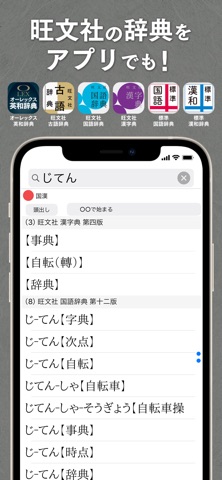


iPad screenshots


Icon palette
About this app
旺文社の辞典をスマートフォンで引けるアプリ ●50年以上の歴史を持つ辞典コンテンツのアプリ化 ●いつでもどこでも手軽に引けるアプリで語彙力や漢字力をUP! ●書籍購入特典のシリアルコードでも利用可能 ●1か月の体験版をぜひお試しください 【オーレックス英和辞典 第3版】 ・膨大な入試問題や言語資料に基づいた約10万6千項目を収録。 ・ネイティブスピーカーの最新の言語使用実態を調査した「PLANET BOARD」、コミュニケーション表現をまとめた「COMMUNICATIVE EXPRESSIONS」、英作文のブラッシュアップ法を例示した「Writing Variations」など、発信(アウトプット)や受験に役立つコラムを多数収録。 ・見出し語検索に加え、成句検索、用例検索(英語/日本語)、見出し語の音声再生機能付き。 【旺文社古語辞典 第十一版】 ・収録語数は類書中トップクラスの43,500語。見出し語を3段階の重要度別に表示。 ・「語意」「語感」「基本義」「学習」などの特設欄で語をあらゆる面から解説。 ・アプリ版には、書籍の内容に加え特別コンテンツとして、有名出典お…
App details
What you can learn from 旺文社辞典アプリ
Every shipping app on the App Store has gone through the same decisions you're working through right now: which screenshot goes first, what caption sits over it, which device frame to show, what color the background should be. The 15 screenshots above are 旺文社辞典アプリ's answers to those questions — they're public, they're real, and they made it through Apple's review.
What the numbers say: 旺文社辞典アプリ runs a mixed light-and-dark set where the background shifts from screenshot to screenshot (first shot #FCFCFC) — each image has to stand on its own, so the captions carry more of the story. The accent colour we picked up, #04B4DC, is the one to reuse for badges, arrows and highlighted words if you borrow this look. Hit Use this style to open the editor with these exact colours and drop your own screenshot in.
Notice the first screenshot in particular. It's the one users see in search results and on the product page, and it's where most apps spend their best caption and tightest design. Look at the proportion of background to phone, where the text sits, what one thing the image is trying to communicate.
Want to see how other Reference apps approach the same problem? Browse more Reference apps in the showcase.
Take what works into your own screenshots
Open LaunchShots and design your App Store & Google Play screenshots — pick a device frame, drop captions, ship in minutes. Free, in your browser.
Open the screenshot editor →Apps with a similar look
Closest background + accent colours among the listings we've analysed — useful when you want to see the same palette handled by a different team.