Chart position — tracked daily by LaunchShots
Screenshot changes — detected by LaunchShots
Screenshot style breakdown
Sampled from 6 of SMTOWN | OFFICIAL's App Store screenshots — background, accent and theme, measured by LaunchShots (not something Apple publishes).
#FCFCFC bg
#DDDDDD
#FC649C accent
#111111 text
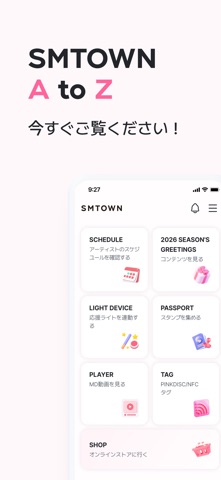
- #1SMTOWN AtoZ
- #3TAG
- #4SCHEDULE
- #5LIGHT DEVICE
- #6PASSPORT
Captions read from the screenshots (OCR, may contain small errors): 5 headlines, 1.4 words on average (longest 2), mostly ALL CAPS.
Screenshots


Icon palette
About this app
ファンに必要なすべての機能、SMTOWNアプリ一つで SM ENTERTAINMENT公式アプリケーション 新しくなったSMTOWN OFFICIALアプリ、今すぐご覧ください! ● SCHEDULE SMアーティストの記念日から音楽放送まで、気になるスケジュールを通知! ● LIGHT DEVICE 応援ライトに名前をつけて、コンサート座席を登録する。 ● PASSPORT コンサート、アニバーサリーを楽しむもう一つの方法 デジタルスタンプを集める ● AR VIEWER SMTOWNのARコンテンツを楽しむ特別な方法 ● PLAYER ビデオプレーヤーでMDを見る ● TAG PINKDISC・MDをタグ付けしてプライベートコンテンツを楽しもう ● SHOP 誰よりも早く出会えるHOT & NEW公式MD SMTOWN A to Z, 新しくなったSMTOWN OFFICIALアプリ、今すぐご覧ください! 利用規約:https://www.smtown.com/policy/terms 個人情報取扱方針:https://www.smtown.com/policy/privacy
App details
What you can learn from SMTOWN | OFFICIAL
Every shipping app on the App Store has gone through the same decisions you're working through right now: which screenshot goes first, what caption sits over it, which device frame to show, what color the background should be. The 7 screenshots above are SMTOWN | OFFICIAL's answers to those questions — they're public, they're real, and they made it through Apple's review.
What the numbers say: SMTOWN | OFFICIAL runs a light set with one background colour (#FCFCFC) carried across every screenshot — the listing reads as a single poster when the shots sit side by side in search results. The accent colour we picked up, #FC649C, is the one to reuse for badges, arrows and highlighted words if you borrow this look. Hit Use this style to open the editor with these exact colours and drop your own screenshot in.
Notice the first screenshot in particular. It's the one users see in search results and on the product page, and it's where most apps spend their best caption and tightest design. Look at the proportion of background to phone, where the text sits, what one thing the image is trying to communicate.
Want to see how other Entertainment apps approach the same problem? Browse more Entertainment apps in the showcase.
Take what works into your own screenshots
Open LaunchShots and design your App Store & Google Play screenshots — pick a device frame, drop captions, ship in minutes. Free, in your browser.
Open the screenshot editor →Apps with a similar look
Closest background + accent colours among the listings we've analysed — useful when you want to see the same palette handled by a different team.