Chart position — tracked daily by LaunchShots
Screenshot changes — detected by LaunchShots
Screenshot style breakdown
Sampled from 6 of 酷家乐, 室内设计: 装修房子 装修设计, 房屋设计, 建筑's App Store screenshots — background, accent and theme, measured by LaunchShots (not something Apple publishes).
#ECECEC bg
#CFCFCF
#7C644C accent
#111111 text
Reading the caption text from the screenshots in your browser…
Screenshots


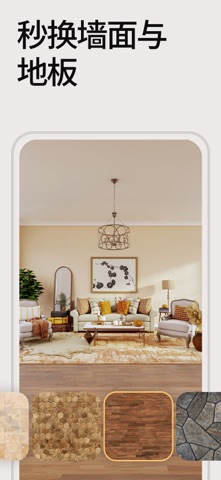


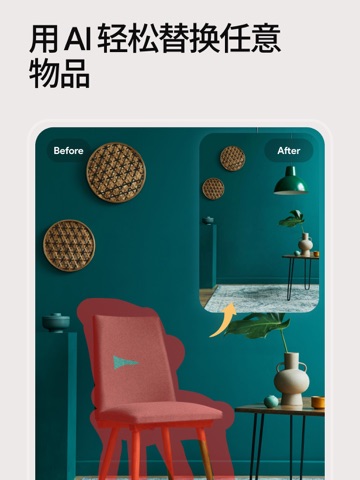
iPad screenshots




Icon palette
About this app
AI Home Design 是一款人工智能室内设计应用,只需一张照片,即可为您重新设计任何房间。只需拍照并选择风格,转瞬间,您的家居空间便能焕然一新。这款适用于 iPhone 和 iPad 的 AI 家居设计应用,让您可以轻松完成室内、室外及花园的重新设计。 无论您是计划翻新房间、寻找家居装饰灵感,还是准备进行房产布置(软装陈设),都可以在投入实际预算之前,先在自己的空间里尝试各种风格、家具、配色和地板方案。 AI 房间设计 - 房间重塑:让您的房间瞬间呈现全新风格 - 空房布置:通过虚拟陈设,为毛坯房或空房间添加家具 - 家具移除:一键清空房间内的物品 - 重新布局:为您的空间探索更理想的家具摆放方案 - 杂物清理:一键清除照片中的杂物 - 区域替换:选定特定区域,将其替换为您想要的任何元素 - 草图变实景:将手绘草图转化为逼真的照片 - 材质更换:随心更换地板、墙面及各类饰面材料 室外与建筑设计 - 外观重塑:赋予房屋全新外观,提升整体视觉吸引力 - 天空与天气变换:自由切换天空背景、季节及天气状况 - 草图渲染:将建筑草图转化为写实照片 花园与景…
App details
What you can learn from 酷家乐, 室内设计: 装修房子 装修设计, 房屋设计, 建筑
Every shipping app on the App Store has gone through the same decisions you're working through right now: which screenshot goes first, what caption sits over it, which device frame to show, what color the background should be. The 20 screenshots above are 酷家乐, 室内设计: 装修房子 装修设计, 房屋设计, 建筑's answers to those questions — they're public, they're real, and they made it through Apple's review.
What the numbers say: 酷家乐, 室内设计: 装修房子 装修设计, 房屋设计, 建筑 runs a light set with one background colour (#ECECEC) carried across every screenshot — the listing reads as a single poster when the shots sit side by side in search results. The accent colour we picked up, #7C644C, is the one to reuse for badges, arrows and highlighted words if you borrow this look. Hit Use this style to open the editor with these exact colours and drop your own screenshot in.
Notice the first screenshot in particular. It's the one users see in search results and on the product page, and it's where most apps spend their best caption and tightest design. Look at the proportion of background to phone, where the text sits, what one thing the image is trying to communicate.
Want to see how other Graphics & Design apps approach the same problem? Browse more Graphics & Design apps in the showcase.
Take what works into your own screenshots
Open LaunchShots and design your App Store & Google Play screenshots — pick a device frame, drop captions, ship in minutes. Free, in your browser.
Open the screenshot editor →Apps with a similar look
Closest background + accent colours among the listings we've analysed — useful when you want to see the same palette handled by a different team.