Chart position — tracked daily by LaunchShots
Screenshot changes — detected by LaunchShots
Screenshot style breakdown
Sampled from 6 of MakePlan – Scanner LiDAR 2D/3D's App Store screenshots — background, accent and theme, measured by LaunchShots (not something Apple publishes).
#F4F4F4 bg
#D6D6D6
#846C54 accent
#111111 text
Reading the caption text from the screenshots in your browser…
Screenshots

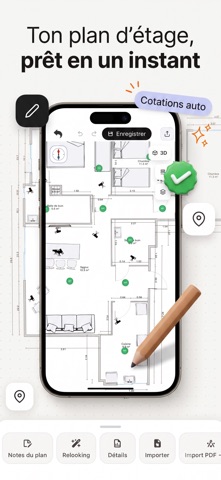


iPad screenshots


Icon palette
About this app
Make Plan transforme votre iPhone en outil professionnel de relevé et de création de plans. Conçu pour les professionnels français du bâtiment et de l’immobilier, MakePlan permet de scanner en LiDAR, mesurer avec précision et générer un plan 2D ou 3D exploitable en quelques minutes. Passez du relevé terrain au livrable client sans ressaisie ni perte de temps. Capturez l’existant instantanément : * Scan LiDAR pour générer un plan d’étage précis * Création automatique de plan 2D maison et plan 3D * Mesures fiables pour métrés et surfaces * Calcul des volumes et organisation des pièces Un flux simple et structuré, pensé pour le terrain. Pensé pour les métiers du bâtiment. Make Plan accompagne : * Agents immobiliers * Artisans et entreprises de rénovation * Diagnostiqueurs énergétiques * Architectes et bureaux d’études * Administrateurs de biens et syndics Chaque métier peut produir…
App details
What you can learn from MakePlan – Scanner LiDAR 2D/3D
Every shipping app on the App Store has gone through the same decisions you're working through right now: which screenshot goes first, what caption sits over it, which device frame to show, what color the background should be. The 19 screenshots above are MakePlan – Scanner LiDAR 2D/3D's answers to those questions — they're public, they're real, and they made it through Apple's review.
What the numbers say: MakePlan – Scanner LiDAR 2D/3D runs a light set with one background colour (#F4F4F4) carried across every screenshot — the listing reads as a single poster when the shots sit side by side in search results. The accent colour we picked up, #846C54, is the one to reuse for badges, arrows and highlighted words if you borrow this look. Hit Use this style to open the editor with these exact colours and drop your own screenshot in.
Notice the first screenshot in particular. It's the one users see in search results and on the product page, and it's where most apps spend their best caption and tightest design. Look at the proportion of background to phone, where the text sits, what one thing the image is trying to communicate.
Want to see how other Graphics & Design apps approach the same problem? Browse more Graphics & Design apps in the showcase.
Take what works into your own screenshots
Open LaunchShots and design your App Store & Google Play screenshots — pick a device frame, drop captions, ship in minutes. Free, in your browser.
Open the screenshot editor →Apps with a similar look
Closest background + accent colours among the listings we've analysed — useful when you want to see the same palette handled by a different team.