Chart position — tracked daily by LaunchShots
Screenshot changes — detected by LaunchShots
Screenshot style breakdown
Sampled from 6 of イラスト変換 写真&画像&アニメ化&アニメ風&アニメ加工's App Store screenshots — background, accent and theme, measured by LaunchShots (not something Apple publishes).
#044CC4 bg
#2765CC
#4CC4FC accent
#FFFFFF text
Screenshots
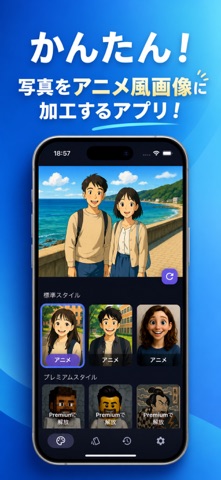
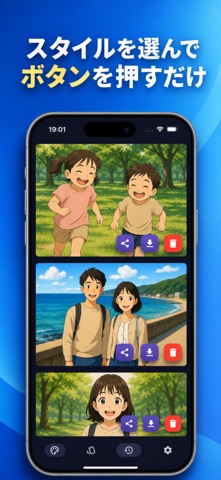


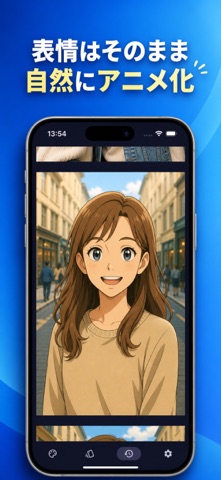
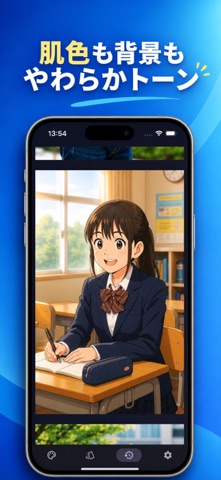
iPad screenshots


Icon palette
About this app
写真をアニメ風に。日常の一枚を、あなただけのイラストに変えてみませんか? 「イラスト変換」は、自撮りや家族写真、ペット、旅行の風景などを、AIでアニメ風イラストやアートに変換する写真加工アプリです。 写真を選び、好きなスタイルでイラストを生成。絵を描く経験や、難しい画像編集の知識は必要ありません。 かわいいアニメ、漫画風の表現、やさしい水彩画など、写真の雰囲気や使い道に合わせて、いつもの一枚を違った表情で楽しめます。 ■ 写真をアニメ化して、自分だけの一枚に お気に入りの自撮りや友人との写真を、アニメのワンシーンのようなイラストに。写真に写った表情やポーズをもとに、AIが新しいタッチで描き出します。 アニメ風の似顔絵を作りたいときや、普段とは違うプロフィール画像を試したいときにも。写真のイラスト化を、身近な楽しみとして取り入れられます。 ■ アニメ・漫画・絵画など、多彩なスタイル かわいいアニメ調、少女漫画、モノクロ漫画、水彩画、油絵、スケッチ、色鉛筆画など、さまざまな表現からスタイルを選べます。…
App details
What you can learn from イラスト変換 写真&画像&アニメ化&アニメ風&アニメ加工
Every shipping app on the App Store has gone through the same decisions you're working through right now: which screenshot goes first, what caption sits over it, which device frame to show, what color the background should be. The 11 screenshots above are イラスト変換 写真&画像&アニメ化&アニメ風&アニメ加工's answers to those questions — they're public, they're real, and they made it through Apple's review.
What the numbers say: イラスト変換 写真&画像&アニメ化&アニメ風&アニメ加工 runs a dark set where the background shifts from screenshot to screenshot (first shot #044CC4) — each image has to stand on its own, so the captions carry more of the story. The accent colour we picked up, #4CC4FC, is the one to reuse for badges, arrows and highlighted words if you borrow this look. Hit Use this style to open the editor with these exact colours and drop your own screenshot in.
Notice the first screenshot in particular. It's the one users see in search results and on the product page, and it's where most apps spend their best caption and tightest design. Look at the proportion of background to phone, where the text sits, what one thing the image is trying to communicate.
Want to see how other Graphics & Design apps approach the same problem? Browse more Graphics & Design apps in the showcase.
Take what works into your own screenshots
Open LaunchShots and design your App Store & Google Play screenshots — pick a device frame, drop captions, ship in minutes. Free, in your browser.
Open the screenshot editor →Apps with a similar look
Closest background + accent colours among the listings we've analysed — useful when you want to see the same palette handled by a different team.