Chart position — tracked daily by LaunchShots
Screenshot style breakdown
Sampled from 6 of メシトラ - カロリー記録, PFC バランス 計算's App Store screenshots — background, accent and theme, measured by LaunchShots (not something Apple publishes).
#FCFCFC bg
#DDDDDD
#F4A424 accent
#111111 text
Reading the caption text from the screenshots in your browser…
Screenshots




Icon palette
About this app
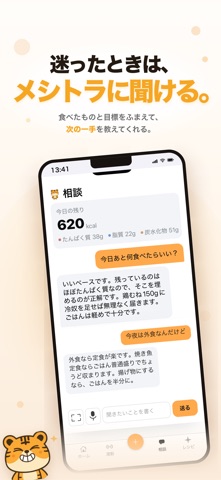
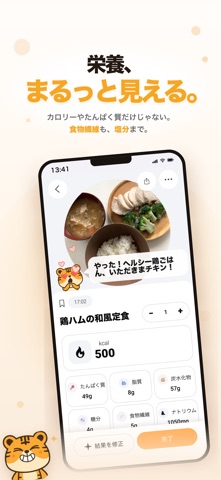
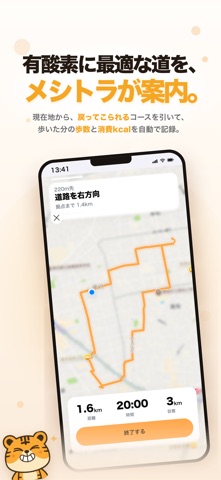
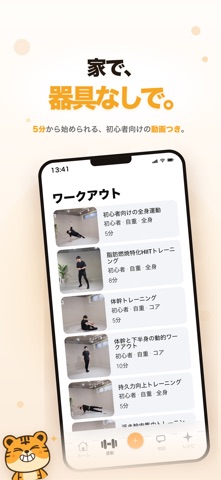
AIで賢く食事管理。 「メシトラ」は、写真を撮るだけでカロリーとPFCバランス(たんぱく質・脂質・炭水化物)を自動で解析する、次世代の食事記録アプリです。 文章で食べたものを入力することもできるので、外食や自炊でも簡単に管理できます。 ■ 迷ったら、そのまま聞ける 「あと何を食べればいい?」「このペースで合ってる?」 食事や運動の疑問を、言葉のまま聞けます。答えには、あなたの目標体重・期限・その日の残りカロリーを踏まえた理由が入ります。 ■ 今日の献立が出てくる 冷蔵庫にあるもの/節約/時短/作り置き/コンビニ/外食。 6つのモードから、その日の残りカロリーに合う献立を提案します。冷蔵庫が空でも、買い物リスト付きで提案できます。 ■ 体重も運動も、ひとつに 毎日の体重を記録したり、軽い運動もログして、あなたのヘルスケア習慣をしっかりサポート。 カロリー管理をスマートダイエットに変えるなら、今すぐ「メシトラ」でスタートしましょう。 本アプリは医療的な助言を提供するものではありません。すべての提案は一般的な…
App details
What you can learn from メシトラ - カロリー記録, PFC バランス 計算
Every shipping app on the App Store has gone through the same decisions you're working through right now: which screenshot goes first, what caption sits over it, which device frame to show, what color the background should be. The 9 screenshots above are メシトラ - カロリー記録, PFC バランス 計算's answers to those questions — they're public, they're real, and they made it through Apple's review.
What the numbers say: メシトラ - カロリー記録, PFC バランス 計算 runs a light set with one background colour (#FCFCFC) carried across every screenshot — the listing reads as a single poster when the shots sit side by side in search results. The accent colour we picked up, #F4A424, is the one to reuse for badges, arrows and highlighted words if you borrow this look. Hit Use this style to open the editor with these exact colours and drop your own screenshot in.
Notice the first screenshot in particular. It's the one users see in search results and on the product page, and it's where most apps spend their best caption and tightest design. Look at the proportion of background to phone, where the text sits, what one thing the image is trying to communicate.
Want to see how other Health & Fitness apps approach the same problem? Browse more Health & Fitness apps in the showcase.
Take what works into your own screenshots
Open LaunchShots and design your App Store & Google Play screenshots — pick a device frame, drop captions, ship in minutes. Free, in your browser.
Open the screenshot editor →Apps with a similar look
Closest background + accent colours among the listings we've analysed — useful when you want to see the same palette handled by a different team.