Chart position — tracked daily by LaunchShots
Screenshot changes — detected by LaunchShots
Screenshot style breakdown
Sampled from 3 of Gamuroid:オールインワン ゲームエミュレーター's App Store screenshots — background, accent and theme, measured by LaunchShots (not something Apple publishes).
#04040C bg
#27272E
#1C0C6C accent
#FFFFFF text
Reading the caption text from the screenshots in your browser…
Screenshots


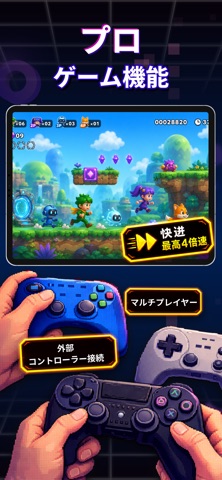
iPad screenshots
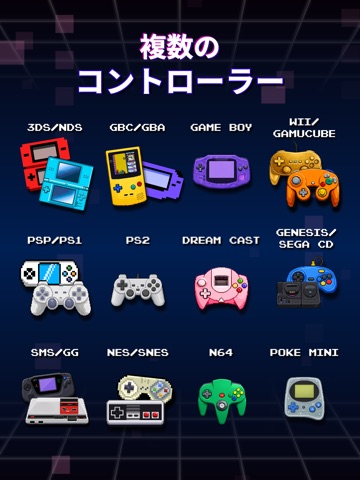


Icon palette
About this app
iPhoneとiPadを、20以上のクラシックなゲーム機をひとつにまとめたオールインワンのレトロゲーム機に。ほとんどの機種はすぐに遊べます。一部の機種では、BIOSやファームウェアなど、ご自身のゲーム機のファイルが必要です。 Gamuroidにはゲーム、BIOS、ファームウェアは含まれていません。例外は、Gamuroidチームが制作した無料デモゲーム「Bamboo Bee」だけです。使用する権利のあるゲームのみを取り込んでください。 20以上の機種に対応 • 任天堂:3DS、DS (NDS)、GameCube、Wii、N64、GBA、GBC、GB、NES、Famicom Disk System、SNES、Virtual Boy • ソニー:PSP、PS1、PS2、PS3 • セガ:Dreamcast、Saturn、Genesis / Mega Drive、Master System、Game Gear、Sega CD、SG-1000 動作速度はゲームとデバイスによって異なります。 自由なスタイルで遊ぶ • ステートセーブ:どこでもセーブして再開 • 早送り:レベル上げ、ムービー、長いロードをスキップ • チートコード(対応機種のみ) • クラウド同期(プレミアム):ライブラリとセーブをバックアップし、別の…
App details
What you can learn from Gamuroid:オールインワン ゲームエミュレーター
Every shipping app on the App Store has gone through the same decisions you're working through right now: which screenshot goes first, what caption sits over it, which device frame to show, what color the background should be. The 6 screenshots above are Gamuroid:オールインワン ゲームエミュレーター's answers to those questions — they're public, they're real, and they made it through Apple's review.
What the numbers say: Gamuroid:オールインワン ゲームエミュレーター runs a dark set with one background colour (#04040C) carried across every screenshot — the listing reads as a single poster when the shots sit side by side in search results. The accent colour we picked up, #1C0C6C, is the one to reuse for badges, arrows and highlighted words if you borrow this look. Hit Use this style to open the editor with these exact colours and drop your own screenshot in.
Notice the first screenshot in particular. It's the one users see in search results and on the product page, and it's where most apps spend their best caption and tightest design. Look at the proportion of background to phone, where the text sits, what one thing the image is trying to communicate.
Want to see how other Entertainment apps approach the same problem? Browse more Entertainment apps in the showcase.
Take what works into your own screenshots
Open LaunchShots and design your App Store & Google Play screenshots — pick a device frame, drop captions, ship in minutes. Free, in your browser.
Open the screenshot editor →Apps with a similar look
Closest background + accent colours among the listings we've analysed — useful when you want to see the same palette handled by a different team.