Chart position — tracked daily by LaunchShots
Screenshot style breakdown
Sampled from 5 of 焕颜证件照-最美证件照制作一键抠图智能美颜换装一寸照二寸照's App Store screenshots — background, accent and theme, measured by LaunchShots (not something Apple publishes).
#ECECEC bg
#CFCFCF
#3C9CDC accent
#111111 text
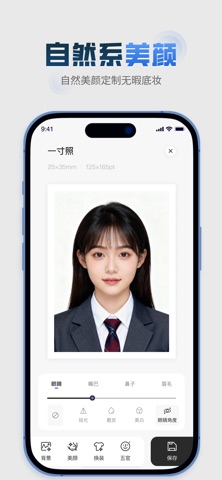
- #1发 丝 级 抠 国 Al 助力 效果 , 多 种 底 色 一 键 切换 < 换 背 景色
- #2自然 美 颜 定制 无 暇 底 妆
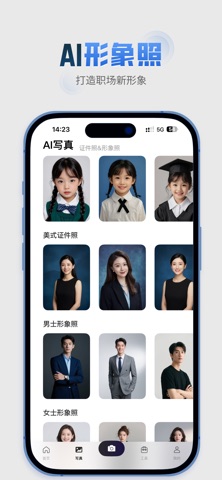
- #3打造 职场 新 形象 ( 14:23 人 #56 @ \ AI 写真
- #5精致 妆容 尽 显 最 美容 颜
Captions read from the screenshots (OCR, may contain small errors): 4 headlines, 11.8 words on average (longest 20).
Screenshots



Icon palette
About this app
焕颜证件照集专业尺寸、智能抠图、自然美颜、在线换装和便捷冲印于一体,是您制作各类证件照的全能助手。立即下载,轻松打造您的最美证件照! 百种官方尺寸,覆盖全场景 | 专业 - 常规尺寸: 精准涵盖1寸、2寸、3寸、4寸等常用规格。 - 学生专用: 毕业照、学位照、入学照。 - 考试必备: 公务员、考研、会计、计算机、医护、幼师及各类语言考试。 - 生活常用: 社保、签证、简历、驾照等。 - 智能推荐: 软件主动推荐当下热门尺寸,助您高效制作,满足各类需求。 AI智能抠图,随心换背景 | 智能 - 发丝级精度: 采用先进AI抠图引擎,即使发丝细节也能完美处理,PS小白也能轻松上手。 - 丰富背景库: 除了标准的红、蓝、白色,还提供高级色与糖果色,可根据不同场景要求自由切换。 - 一图多用: 确保专业合规的同时,让一张照片适应多种用途,旧照片也能焕然一新。 自然美颜美妆,焕发神采 | 高级 - 精雕细琢: AI算法提供磨皮、美白、瘦脸、亮眼、去黑眼圈、淡化法令纹等多维度美颜功能。 - 一键上妆: 专为“手残党”设计,提供自然妆、元气妆、女神/男神妆等多种…
App details
What you can learn from 焕颜证件照-最美证件照制作一键抠图智能美颜换装一寸照二寸照
Every shipping app on the App Store has gone through the same decisions you're working through right now: which screenshot goes first, what caption sits over it, which device frame to show, what color the background should be. The 5 screenshots above are 焕颜证件照-最美证件照制作一键抠图智能美颜换装一寸照二寸照's answers to those questions — they're public, they're real, and they made it through Apple's review.
What the numbers say: 焕颜证件照-最美证件照制作一键抠图智能美颜换装一寸照二寸照 runs a light set with one background colour (#ECECEC) carried across every screenshot — the listing reads as a single poster when the shots sit side by side in search results. The accent colour we picked up, #3C9CDC, is the one to reuse for badges, arrows and highlighted words if you borrow this look. Hit Use this style to open the editor with these exact colours and drop your own screenshot in.
Notice the first screenshot in particular. It's the one users see in search results and on the product page, and it's where most apps spend their best caption and tightest design. Look at the proportion of background to phone, where the text sits, what one thing the image is trying to communicate.
Want to see how other Graphics & Design apps approach the same problem? Browse more Graphics & Design apps in the showcase.
Take what works into your own screenshots
Open LaunchShots and design your App Store & Google Play screenshots — pick a device frame, drop captions, ship in minutes. Free, in your browser.
Open the screenshot editor →Apps with a similar look
Closest background + accent colours among the listings we've analysed — useful when you want to see the same palette handled by a different team.