Chart position — tracked daily by LaunchShots
Screenshot style breakdown
Sampled from 6 of 车载小组件 & 上车欢迎语 : CarWidgetGo's App Store screenshots — background, accent and theme, measured by LaunchShots (not something Apple publishes).
#040404 bg
#272727
#AC6C9C accent
#FFFFFF text
Reading the caption text from the screenshots in your browser…
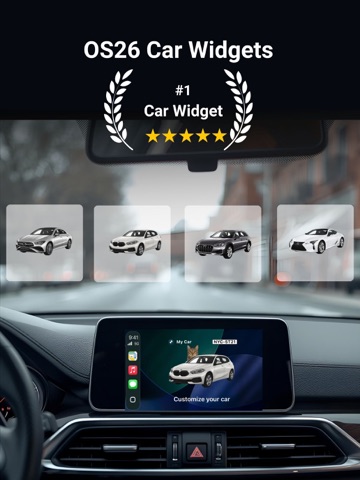
Screenshots


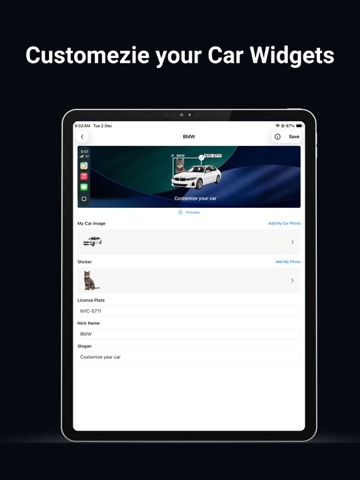
iPad screenshots

Icon palette
About this app
DIY你的 CarPlay 屏幕。 CarWidgetGo 是专为车载场景打造的 CarPlay 小组件定制工具,无论你偏爱运动质感、极简高级风,还是想要专属纪念日、倒计时、照片仪表盘,都能通过现成模板或自由编辑器,几分钟打造契合你爱车与驾驶风格的车机界面。 **海量模板,一键上手** 我们提供持续更新的小组件模板库,覆盖运动风、简约风、高级质感、原生仪表盘、时钟、纪念日、倒计时等多种主题。选中模板微调细节,几秒就能让车机屏幕焕然一新。 **自由编辑,全量自定义** 想要更多创作空间?内置专业编辑器支持从零搭建你的专属小组件。自由添加照片、贴纸、图标、文字,调整背景与布局 —— 无论是简洁驾驶仪表盘、爱车写真展示,还是浪漫纪念日、重要事件倒计时,都能随心实现。 **爱车实拍,融入桌面** 上传你的真实车辆照片,一键自动去除背景,让爱车成为小组件的视觉主角。打造更有归属感的车机仪表盘,让每一次启动都充满仪式感。 **丰富装饰,细节拉满** 海量汽车主题与生活方式贴纸、图标、装饰元素可选,用细节彰显你的个性与品味,让车机界面更有表达感。 **启…
App details
What you can learn from 车载小组件 & 上车欢迎语 : CarWidgetGo
Every shipping app on the App Store has gone through the same decisions you're working through right now: which screenshot goes first, what caption sits over it, which device frame to show, what color the background should be. The 9 screenshots above are 车载小组件 & 上车欢迎语 : CarWidgetGo's answers to those questions — they're public, they're real, and they made it through Apple's review.
What the numbers say: 车载小组件 & 上车欢迎语 : CarWidgetGo runs a dark set with one background colour (#040404) carried across every screenshot — the listing reads as a single poster when the shots sit side by side in search results. The accent colour we picked up, #AC6C9C, is the one to reuse for badges, arrows and highlighted words if you borrow this look. Hit Use this style to open the editor with these exact colours and drop your own screenshot in.
Notice the first screenshot in particular. It's the one users see in search results and on the product page, and it's where most apps spend their best caption and tightest design. Look at the proportion of background to phone, where the text sits, what one thing the image is trying to communicate.
Want to see how other Graphics & Design apps approach the same problem? Browse more Graphics & Design apps in the showcase.
Take what works into your own screenshots
Open LaunchShots and design your App Store & Google Play screenshots — pick a device frame, drop captions, ship in minutes. Free, in your browser.
Open the screenshot editor →Apps with a similar look
Closest background + accent colours among the listings we've analysed — useful when you want to see the same palette handled by a different team.