Screenshot changes — detected by LaunchShots
Screenshot style breakdown
Sampled from 6 of 马年鬼服版-刀刀高爆切割服's App Store screenshots — background, accent and theme, measured by LaunchShots (not something Apple publishes).
#040404 bg
#272727
#5C3414 accent
#FFFFFF text
Screenshots


iPad screenshots




Icon palette
About this app
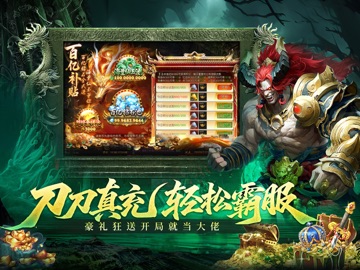
东方玄幻风格蓝金与红金配色的两位战神隔空对峙,左侧蓝龙吐息、右侧火龙喷薄,中间盘踞着狰狞的火龙虚影,背景云雾翻涌、山峦隐现,正中央金色按钮镶嵌龙纹特效,瞬间营造出冰火对决、龙域争霸的宏大战斗基调,预示着一场关乎三界的征伐之旅。
App details
What you can learn from 马年鬼服版-刀刀高爆切割服
Every shipping app on the App Store has gone through the same decisions you're working through right now: which screenshot goes first, what caption sits over it, which device frame to show, what color the background should be. The 14 screenshots above are 马年鬼服版-刀刀高爆切割服's answers to those questions — they're public, they're real, and they made it through Apple's review.
What the numbers say: 马年鬼服版-刀刀高爆切割服 runs a dark set with one background colour (#040404) carried across every screenshot — the listing reads as a single poster when the shots sit side by side in search results. The accent colour we picked up, #5C3414, is the one to reuse for badges, arrows and highlighted words if you borrow this look. Hit Use this style to open the editor with these exact colours and drop your own screenshot in.
Notice the first screenshot in particular. It's the one users see in search results and on the product page, and it's where most apps spend their best caption and tightest design. Look at the proportion of background to phone, where the text sits, what one thing the image is trying to communicate.
Want to see how other Entertainment apps approach the same problem? Browse more Entertainment apps in the showcase.
Take what works into your own screenshots
Open LaunchShots and design your App Store & Google Play screenshots — pick a device frame, drop captions, ship in minutes. Free, in your browser.
Open the screenshot editor →Apps with a similar look
Closest background + accent colours among the listings we've analysed — useful when you want to see the same palette handled by a different team.