launchshots / showcase / developer tools / mlxhub: ローカルaiチャット

MLXHub: ローカルAIチャット

Developer Tools ★ 4.0 (2) 無料 9+ 102.1 MB

Chart position — tracked daily by LaunchShots

#86 of 100
Top Free Developer Tools · Germany
best #86 · 2 days tracked · as of Nov 22
#93 of 100
Top Free Developer Tools · Japan
best #93 · 1 day tracked · as of Oct 26
— / 7d
#94 of 100
Top Free Developer Tools · South Africa
best #94 · 1 day tracked · as of Oct 25
— / 7d
#99 of 100
Top Free Developer Tools · Poland
best #99 · 1 day tracked · as of Nov 14
— / 7d

Screenshot changes — detected by LaunchShots

Nov 14, 2026
MLXHub: ローカルAIチャット added 4 iPhone screenshots (6 → 10); switched from a dark to a mixed theme; moved to captions below the phone (was captions above the phone); started varying the background per screenshot. →
Oct 8, 2026
MLXHub: ローカルAIチャット added 1 iPhone screenshot (5 → 6). →
Aug 30, 2026
MLXHub: ローカルAIチャット moved to captions above the phone (was captions below the phone); changed the accent colour from #FCDC94 to #8C5C04. →

Screenshot style breakdown

Sampled from 6 of MLXHub: ローカルAIチャット's App Store screenshots — background, accent and theme, measured by LaunchShots (not something Apple publishes).

Use this style →
10 iPhone screenshots · 10 iPad Mixed light / dark Background changes per screenshot
#040404 bg #272727 #8C5C04 accent #FFFFFF text

Reading the caption text from the screenshots in your browser…

vs. Developer Tools apps we've analysed (1573): 39% use a light theme; 34% put the caption above the phone — MLXHub: ローカルAIチャット puts it below; the average set has 5.6 screenshots — MLXHub: ローカルAIチャット ships 10. Full Developer Tools benchmark →

Screenshots

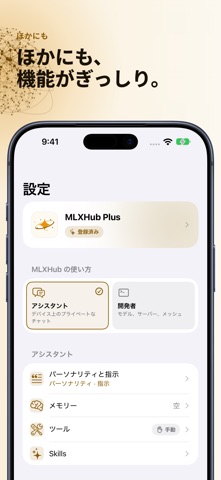
#1 MLXHub: ローカルAIチャット iPhone screenshot 1
#2 MLXHub: ローカルAIチャット iPhone screenshot 2
#3 MLXHub: ローカルAIチャット iPhone screenshot 3
#4 MLXHub: ローカルAIチャット iPhone screenshot 4
#5 MLXHub: ローカルAIチャット iPhone screenshot 5
#6 MLXHub: ローカルAIチャット iPhone screenshot 6
#7 MLXHub: ローカルAIチャット iPhone screenshot 7
#8 MLXHub: ローカルAIチャット iPhone screenshot 8
#9 MLXHub: ローカルAIチャット iPhone screenshot 9
#10 MLXHub: ローカルAIチャット iPhone screenshot 10

iPad screenshots

#1 MLXHub: ローカルAIチャット iPad screenshot 1
#2 MLXHub: ローカルAIチャット iPad screenshot 2
#3 MLXHub: ローカルAIチャット iPad screenshot 3
#4 MLXHub: ローカルAIチャット iPad screenshot 4
#5 MLXHub: ローカルAIチャット iPad screenshot 5
#6 MLXHub: ローカルAIチャット iPad screenshot 6
#7 MLXHub: ローカルAIチャット iPad screenshot 7
#8 MLXHub: ローカルAIチャット iPad screenshot 8
#9 MLXHub: ローカルAIチャット iPad screenshot 9
#10 MLXHub: ローカルAIチャット iPad screenshot 10

Icon palette

extracting…
Dominant colors sampled from the icon — click any swatch to copy the hex.

About this app

iPhoneとiPadの中で動く、ネット不要のAI。声で話しかけて答えを聞き、端末内で画像を作り、ローカルネットワーク向けのサーバーにもなります。メッセージ数のカウントはありません。 話しかければ、声で答える 音声モードは、設定済みの言語で話した内容を端末内で文字に起こし、自然な声で答えます。途中でいつでも割り込めます。 日々の用事を手伝うツール 対応ツールでカレンダー、リマインダー、ヘルスケアのデータ、写真、ミュージックライブラリを確認できます。どのツールを許可するかは自分で設定できます。MLXHub Plusでは、予定やリマインダーの作成、ヘルスケアデータの記録、繰り返し使う指示をSkillsとして保存することもできます。使えるツールや結果はモデルによって異なります。 自分で管理できる記憶 次の会話に役立つことを保存し、「設定」で確認、固定、削除できます。Plusでは、対応モデルが自分で記憶を保存・削除することもできます。 端末内で画像を作成 対応する画像モデルをダウンロードすれば、クラウドに何も送らずに画像を作れます…

App details

Bundle ID
com.DreamFoundries.MLXHub
Latest version
2.3.1
Released
Jul 14, 2026
Last updated
Nov 9, 2026
Languages
13 (AR, EN, FR, DE, EL…)
Genres
開発ツール, 仕事効率化

What you can learn from MLXHub: ローカルAIチャット

Every shipping app on the App Store has gone through the same decisions you're working through right now: which screenshot goes first, what caption sits over it, which device frame to show, what color the background should be. The 20 screenshots above are MLXHub: ローカルAIチャット's answers to those questions — they're public, they're real, and they made it through Apple's review.

What the numbers say: MLXHub: ローカルAIチャット runs a mixed light-and-dark set where the background shifts from screenshot to screenshot (first shot #040404) — each image has to stand on its own, so the captions carry more of the story. The accent colour we picked up, #8C5C04, is the one to reuse for badges, arrows and highlighted words if you borrow this look. Hit Use this style to open the editor with these exact colours and drop your own screenshot in.

Notice the first screenshot in particular. It's the one users see in search results and on the product page, and it's where most apps spend their best caption and tightest design. Look at the proportion of background to phone, where the text sits, what one thing the image is trying to communicate.

Want to see how other Developer Tools apps approach the same problem? Browse more Developer Tools apps in the showcase.

Take what works into your own screenshots

Open LaunchShots and design your App Store & Google Play screenshots — pick a device frame, drop captions, ship in minutes. Free, in your browser.

Open the screenshot editor →

Apps with a similar look

Closest background + accent colours among the listings we've analysed — useful when you want to see the same palette handled by a different team.

Journal Coffee: Every Time
#040404 #945404
Uniscore - Résultats direct
#040404 #845404
KYRO 키로: 러닝 코스와 영토 게임
#040404 #8C6C04
Catchii-Voice party Rooms
#040404 #946C04
Bitget- Buy Crypto & Bitcoin
#040404 #845414
Sim Daltonism
#040404 #8C641C

More Developer Tools apps

Latest from the blog

Guides
Configuring Game Center in App Store Connect: Leaderboards and Achievements
Nov 22, 2026
News
Google Play Financial Features Declaration: Avoid Suspensions
Nov 21, 2026
Guides
iOS & Android App Accessibility Guide for Indie Developers
Nov 20, 2026
Tips
Implement Apple AdServices Framework: Zero-SDK Attribution
Nov 19, 2026
1 / 1
copied