Screenshot changes — detected by LaunchShots
Screenshot style breakdown
Sampled from 5 of ひらっしーのPhysical Club 道場's App Store screenshots — background, accent and theme, measured by LaunchShots (not something Apple publishes).
#0C1424 bg
#2E3442
#CC3434 accent
#FFFFFF text
Screenshots
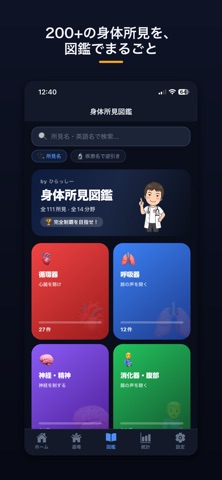


iPad screenshots

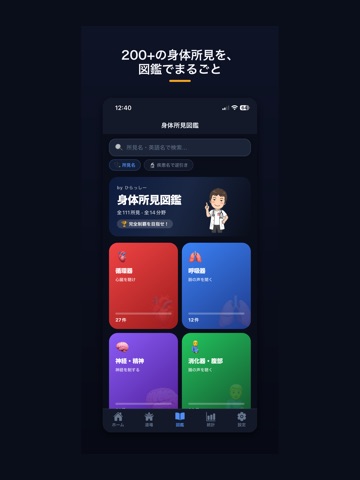

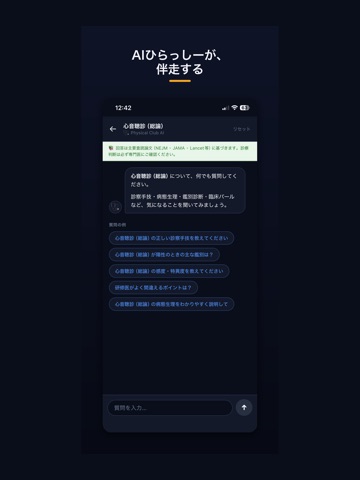

Icon palette
About this app
「ひらっしーのPhysical Club 道場」は、身体診察を“楽しく・本気で”学べる医療系学習アプリです。研修医・医学生・看護師など、ベッドサイドの実力を上げたいすべての人へ。 ■ 身体所見アトラス(図鑑) 循環器、呼吸器、神経、腹部、皮膚など、さまざまな分野の身体所見を体系的に収録。所見ごとに「診察手順」「正常 vs 異常」「臨床的意義」「コツ・よくあるミス」「診断精度」「参考文献」などを確認できます(収録項目は所見によって異なります)。根拠を確認しながら学べます。 ■ 症例クイズ(臨床推論トレーニング) 患者の病歴・バイタル・所見から診断や次の一手を考える、国試・臨床問題スタイルの症例クイズ。選ばなかった選択肢にも解説がつき、「なぜそれが違うのか」まで学べます。 ■ AIチャット「ひらっしー」 わからないことをその場で質問。あなたの学習に寄り添って解説します。 ■ 続けたくなる仕組み 経験値・レベル・連続記録(ストリーク)・デイリー目標で、毎日の学習が習慣に。 ■ 信頼できる内容 多くの所見で、ガイドラインや原著論文…
App details
What you can learn from ひらっしーのPhysical Club 道場
Every shipping app on the App Store has gone through the same decisions you're working through right now: which screenshot goes first, what caption sits over it, which device frame to show, what color the background should be. The 10 screenshots above are ひらっしーのPhysical Club 道場's answers to those questions — they're public, they're real, and they made it through Apple's review.
What the numbers say: ひらっしーのPhysical Club 道場 runs a dark set with one background colour (#0C1424) carried across every screenshot — the listing reads as a single poster when the shots sit side by side in search results. The accent colour we picked up, #CC3434, is the one to reuse for badges, arrows and highlighted words if you borrow this look. Hit Use this style to open the editor with these exact colours and drop your own screenshot in.
Notice the first screenshot in particular. It's the one users see in search results and on the product page, and it's where most apps spend their best caption and tightest design. Look at the proportion of background to phone, where the text sits, what one thing the image is trying to communicate.
Want to see how other Medical apps approach the same problem? Browse more Medical apps in the showcase.
Take what works into your own screenshots
Open LaunchShots and design your App Store & Google Play screenshots — pick a device frame, drop captions, ship in minutes. Free, in your browser.
Open the screenshot editor →Apps with a similar look
Closest background + accent colours among the listings we've analysed — useful when you want to see the same palette handled by a different team.