Chart position — tracked daily by LaunchShots
Screenshot changes — detected by LaunchShots
Screenshot style breakdown
Sampled from 6 of Shaply's App Store screenshots — background, accent and theme, measured by LaunchShots (not something Apple publishes).
#140C0C bg
#342E2E
#BC4C04 accent
#FFFFFF text
Reading the caption text from the screenshots in your browser…
Screenshots




Icon palette
About this app
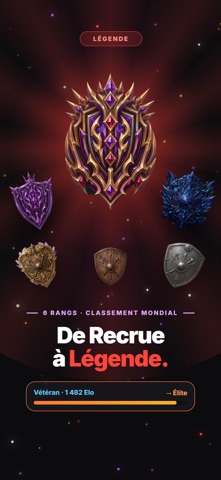
Shaply transforme tes pompes en jeu. Pose ton téléphone devant toi : la caméra compte chaque répétition, et chaque répétition compte. En duel, contre des monstres ou avec ta guilde. LA CAMÉRA COMPTE POUR TOI Pose ton téléphone, entraîne-toi : la caméra analyse ta posture et compte chaque répétition automatiquement. Une jauge mesure l'amplitude de tes mouvements en temps réel, et seules les vraies reps comptent. Aucun accessoire, aucune montre connectée. DUELS 1V1 EN TEMPS RÉEL 60 secondes de pompes contre un joueur de ton niveau. Gagne de l'Elo et grimpe les 6 rangs du classement mondial, de Recrue à Légende. Défie aussi tes amis quand tu veux. L'AVENTURE 8 biomes à explorer, des dizaines de monstres et un boss au bout de chaque monde. Chaque répétition inflige des dégâts. Gagne de l'XP, ouvre des coffres et équipe-toi pour frapper plus fort. GUILDES ET RAIDS Rejoins une guilde ou c…
App details
What you can learn from Shaply
Every shipping app on the App Store has gone through the same decisions you're working through right now: which screenshot goes first, what caption sits over it, which device frame to show, what color the background should be. The 10 screenshots above are Shaply's answers to those questions — they're public, they're real, and they made it through Apple's review.
What the numbers say: Shaply runs a dark set with one background colour (#140C0C) carried across every screenshot — the listing reads as a single poster when the shots sit side by side in search results. The accent colour we picked up, #BC4C04, is the one to reuse for badges, arrows and highlighted words if you borrow this look. Hit Use this style to open the editor with these exact colours and drop your own screenshot in.
Notice the first screenshot in particular. It's the one users see in search results and on the product page, and it's where most apps spend their best caption and tightest design. Look at the proportion of background to phone, where the text sits, what one thing the image is trying to communicate.
Want to see how other Sports apps approach the same problem? Browse more Sports apps in the showcase.
Take what works into your own screenshots
Open LaunchShots and design your App Store & Google Play screenshots — pick a device frame, drop captions, ship in minutes. Free, in your browser.
Open the screenshot editor →Apps with a similar look
Closest background + accent colours among the listings we've analysed — useful when you want to see the same palette handled by a different team.