Screenshot style breakdown
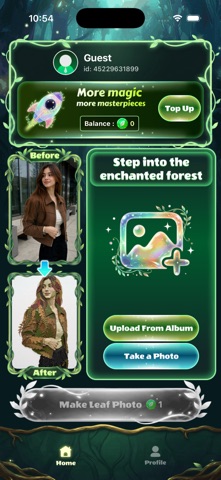
Sampled from 3 of Nymph AI's App Store screenshots — background, accent and theme, measured by LaunchShots (not something Apple publishes).
#041C1C bg
#273B3B
#247C44 accent
#FFFFFF text
Screenshots


Icon palette
About this app
Step into the enchanted forest of digital art with Nymph AI! What if your favorite memories could be woven together by nature itself? Nymph AI is a revolutionary photo-editing experience that uses advanced artificial intelligence to transform your everyday photos into breathtaking, lifelike Leaf Collage masterpieces. Inspired by the mythical guardians of nature, Nymph AI doesn't just apply a basic filter. It reimagines your portraits, landscapes, and pet photos as intricate tapestries made entirely of vibrant foliage, autumn leaves, delicate petals, and woodland textures. It’s where modern AI technology meets digital eco-art! Why You'll Love Nymph AI: Botanical Alchemy Upload any photo and watch as our AI carefully "hand-crafts" your image using hundreds of unique leaf shapes, textures, and natural colors. From the warm, rustic tones of autumn maples to the lush green of spring ferns, …
App details
What you can learn from Nymph AI
Every shipping app on the App Store has gone through the same decisions you're working through right now: which screenshot goes first, what caption sits over it, which device frame to show, what color the background should be. The 3 screenshots above are Nymph AI's answers to those questions — they're public, they're real, and they made it through Apple's review.
What the numbers say: Nymph AI runs a dark set with one background colour (#041C1C) carried across every screenshot — the listing reads as a single poster when the shots sit side by side in search results. The accent colour we picked up, #247C44, is the one to reuse for badges, arrows and highlighted words if you borrow this look. Hit Use this style to open the editor with these exact colours and drop your own screenshot in.
Notice the first screenshot in particular. It's the one users see in search results and on the product page, and it's where most apps spend their best caption and tightest design. Look at the proportion of background to phone, where the text sits, what one thing the image is trying to communicate.
Want to see how other Entertainment apps approach the same problem? Browse more Entertainment apps in the showcase.
Take what works into your own screenshots
Open LaunchShots and design your App Store & Google Play screenshots — pick a device frame, drop captions, ship in minutes. Free, in your browser.
Open the screenshot editor →Apps with a similar look
Closest background + accent colours among the listings we've analysed — useful when you want to see the same palette handled by a different team.