Chart position — tracked daily by LaunchShots
Screenshot style breakdown
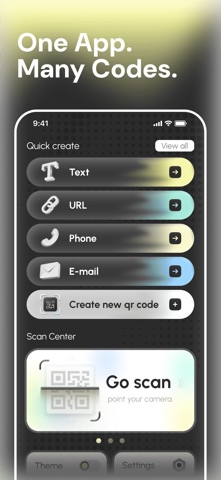
Sampled from 6 of Open QRCode - Scan's App Store screenshots — background, accent and theme, measured by LaunchShots (not something Apple publishes).
#6C6C6C bg
#808080
#CCCC84 accent
#FFFFFF text
Screenshots


Icon palette
About this app
Open QRCodeで、自己紹介をもっとスムーズに。デジタル名刺の作成、身近な情報のQRコード化、コードのスキャン、画像からのテキスト抽出をひとつのアプリで。打ち合わせに向けて連絡先情報を準備するときも、QRコードの内容を確認するときも、Open QRCodeが仕事や日常で役立つツールを提供します。 デジタル名刺を作成 Open QRCodeで連絡先情報をデジタル名刺に。掲載したい情報を選び、ビジネスでの自己紹介や交流イベント、日常の出会いに使える名刺を作成できます。 見込み客と会うときも、同僚とつながるときも、初めての相手に自己紹介するときも、デジタル名刺なら連絡先情報をひとつにまとめて伝えられます。 身近な情報をQRコードに テキスト、ウェブサイトのURL、電話番号、メールアドレスからQRコードを作成できます。コンテンツの種類を選んで情報を入力するだけで、コードを生成できます。複数のコンテンツ形式に対応しているため、情報をコンパクトでわかりやすい形にまとめて提示できます。 QRコードをスキャン QRコードをスキャンして、含まれてい…
App details
What you can learn from Open QRCode - Scan
Every shipping app on the App Store has gone through the same decisions you're working through right now: which screenshot goes first, what caption sits over it, which device frame to show, what color the background should be. The 6 screenshots above are Open QRCode - Scan's answers to those questions — they're public, they're real, and they made it through Apple's review.
What the numbers say: Open QRCode - Scan runs a mixed light-and-dark set where the background shifts from screenshot to screenshot (first shot #6C6C6C) — each image has to stand on its own, so the captions carry more of the story. The accent colour we picked up, #CCCC84, is the one to reuse for badges, arrows and highlighted words if you borrow this look. Hit Use this style to open the editor with these exact colours and drop your own screenshot in.
Notice the first screenshot in particular. It's the one users see in search results and on the product page, and it's where most apps spend their best caption and tightest design. Look at the proportion of background to phone, where the text sits, what one thing the image is trying to communicate.
Want to see how other Utilities apps approach the same problem? Browse more Utilities apps in the showcase.
Take what works into your own screenshots
Open LaunchShots and design your App Store & Google Play screenshots — pick a device frame, drop captions, ship in minutes. Free, in your browser.
Open the screenshot editor →Apps with a similar look
Closest background + accent colours among the listings we've analysed — useful when you want to see the same palette handled by a different team.