Chart position — tracked daily by LaunchShots
Screenshot style breakdown
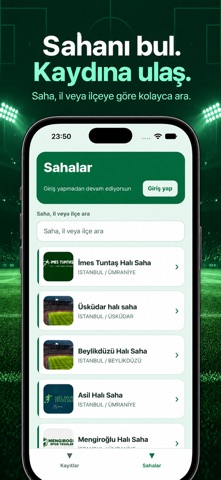
Sampled from 3 of Halısaha Kameraları's App Store screenshots — background, accent and theme, measured by LaunchShots (not something Apple publishes).
#FCFCFC bg
#DDDDDD
#046C3C accent
#111111 text
Screenshots


iPad screenshots


Icon palette
About this app
Halısaha Kameraları, kameralı halı sahalarda oynadığın maçların kayıtlarını tek bir yerde toplar. Maçtan sonra uygulamayı aç, oynadığın günü ve sahayı seç; maçının kaydı karşında. Golünü, kurtarışını ya da kaçırdığın o pozisyonu istediğin kadar izle. Neler yapabilirsin: • Güne göre kayıtlar: Bugünün ve önceki günlerin maç kayıtlarını tarih seçerek listele. • Saha ara: Saha adına, iline veya ilçesine göre ara, sahanın maçlarına göz at. • Rahat izleme: Oynat/duraklat, 10 saniye ileri-geri sar, tam ekrana geç. • Hesapsız kullanım: İstersen giriş yapmadan da kayıtlara göz atabilirsin. Gizliliğine önem veriyoruz: Hesap için yalnızca ad ve e-posta bilgini saklıyoruz. Uygulama ücretsizdir ve reklam desteklidir; kişiselleştirilmiş reklam için izin istenir, izin vermesen de tüm özellikleri kullanabilirsin. Hesabını dilediğin an uygulama içinden silebilirsin. Sorun ve önerilerin için: siram.d…
App details
What you can learn from Halısaha Kameraları
Every shipping app on the App Store has gone through the same decisions you're working through right now: which screenshot goes first, what caption sits over it, which device frame to show, what color the background should be. The 6 screenshots above are Halısaha Kameraları's answers to those questions — they're public, they're real, and they made it through Apple's review.
What the numbers say: Halısaha Kameraları runs a mixed light-and-dark set where the background shifts from screenshot to screenshot (first shot #FCFCFC) — each image has to stand on its own, so the captions carry more of the story. The accent colour we picked up, #046C3C, is the one to reuse for badges, arrows and highlighted words if you borrow this look. Hit Use this style to open the editor with these exact colours and drop your own screenshot in.
Notice the first screenshot in particular. It's the one users see in search results and on the product page, and it's where most apps spend their best caption and tightest design. Look at the proportion of background to phone, where the text sits, what one thing the image is trying to communicate.
Want to see how other Sports apps approach the same problem? Browse more Sports apps in the showcase.
Take what works into your own screenshots
Open LaunchShots and design your App Store & Google Play screenshots — pick a device frame, drop captions, ship in minutes. Free, in your browser.
Open the screenshot editor →Apps with a similar look
Closest background + accent colours among the listings we've analysed — useful when you want to see the same palette handled by a different team.