Screenshot changes — detected by LaunchShots
Screenshot style breakdown
Sampled from 6 of Evolya - Manifestation's App Store screenshots — background, accent and theme, measured by LaunchShots (not something Apple publishes).
#F4ECFC bg
#D6CFDD
#542CB4 accent
#111111 text
Reading the caption text from the screenshots in your browser…
Screenshots


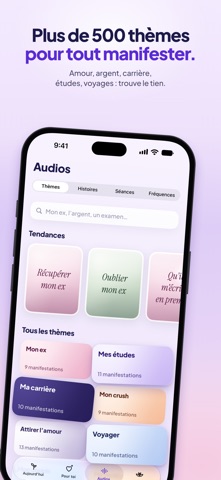

iPad screenshots


Icon palette
About this app
Evolya est une app de manifestation. Tu écris ce que tu veux vivre, et Evolya te le raconte : une histoire écrite autour de tes mots, lue par la voix que tu choisis. Tu l’écoutes comme si c’était déjà arrivé. DIS CE QUE TU VEUX MANIFESTER • Écris-le avec tes mots, au présent : un poste, un examen, un projet, une rencontre, plus de calme • Evolya te propose trois scènes, tu gardes celle qui te ressemble • Ton histoire part de ce que tu as dit de toi : ton prénom, ta ville, les personnes qui comptent UNE VOIX TE LA RACONTE • Plusieurs voix, féminines et masculines : écoute-les et garde celle qui te fait du bien • Suis le texte pendant l’écoute, ralentis ou accélère la lecture • Retrouve tes histoires quand tu veux et garde tes préférées POUR TOI, CHAQUE JOUR • Un fil d’affirmations choisies d’après ce qui compte pour toi : amour, argent, carrière, études, confiance en toi, santé et éne…
App details
What you can learn from Evolya - Manifestation
Every shipping app on the App Store has gone through the same decisions you're working through right now: which screenshot goes first, what caption sits over it, which device frame to show, what color the background should be. The 14 screenshots above are Evolya - Manifestation's answers to those questions — they're public, they're real, and they made it through Apple's review.
What the numbers say: Evolya - Manifestation runs a mixed light-and-dark set where the background shifts from screenshot to screenshot (first shot #F4ECFC) — each image has to stand on its own, so the captions carry more of the story. The accent colour we picked up, #542CB4, is the one to reuse for badges, arrows and highlighted words if you borrow this look. Hit Use this style to open the editor with these exact colours and drop your own screenshot in.
Notice the first screenshot in particular. It's the one users see in search results and on the product page, and it's where most apps spend their best caption and tightest design. Look at the proportion of background to phone, where the text sits, what one thing the image is trying to communicate.
Want to see how other Health & Fitness apps approach the same problem? Browse more Health & Fitness apps in the showcase.
Take what works into your own screenshots
Open LaunchShots and design your App Store & Google Play screenshots — pick a device frame, drop captions, ship in minutes. Free, in your browser.
Open the screenshot editor →Apps with a similar look
Closest background + accent colours among the listings we've analysed — useful when you want to see the same palette handled by a different team.