Screenshot changes — detected by LaunchShots
Screenshot style breakdown
Sampled from 5 of 渋滞フロー's App Store screenshots — background, accent and theme, measured by LaunchShots (not something Apple publishes).
#FCFCFC bg
#DDDDDD
#44A474 accent
#111111 text
Screenshots


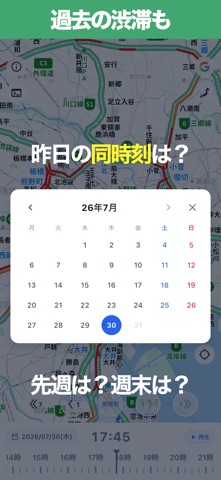


iPad screenshots


Icon palette
About this app
渋滞は「いつ・どこで・どの様に始まったか?」で、「いつ終わるか」も大体分かります。 本アプリでは「今」だけでなく「あの時間は?」も一目でわかります。 【渋滞フローとは】 今の渋滞状況はもちろん、時刻バーで過去の交通状況をさかのぼって見ることもできます。 日本全国の道路渋滞情報と交通規制情報を、地図上でわかりやすく確認できるアプリです。 今も過去もまとめて「渋滞の流れ」を観る事ができるアプリです。 【主な機能】 ■ 渋滞情報の地図表示 道路の渋滞状況を地図上に表示。混雑の様子を一目で把握できます。 ■ 通過時間の地図表示 主要な高速道路の特定区間を定点観測し、通過時間で色分け表示します。 ■ 交通規制情報の表示 通行止めなどの交通規制情報も地図上で確認できます。 ■ 時刻バーで過去の状況を確認 画面上の時刻バーを操作すると、過去の渋滞・規制の状況を確認できます。 「あの時間帯はどうだったか」を調べるのに便利です。 ■ 日付ナビ・カレンダー 日をまたいだ確認もスムーズ。カレンダーから日付を選んで、過去の交通状況…
App details
What you can learn from 渋滞フロー
Every shipping app on the App Store has gone through the same decisions you're working through right now: which screenshot goes first, what caption sits over it, which device frame to show, what color the background should be. The 9 screenshots above are 渋滞フロー's answers to those questions — they're public, they're real, and they made it through Apple's review.
What the numbers say: 渋滞フロー runs a mixed light-and-dark set where the background shifts from screenshot to screenshot (first shot #FCFCFC) — each image has to stand on its own, so the captions carry more of the story. The accent colour we picked up, #44A474, is the one to reuse for badges, arrows and highlighted words if you borrow this look. Hit Use this style to open the editor with these exact colours and drop your own screenshot in.
Notice the first screenshot in particular. It's the one users see in search results and on the product page, and it's where most apps spend their best caption and tightest design. Look at the proportion of background to phone, where the text sits, what one thing the image is trying to communicate.
Want to see how other Navigation apps approach the same problem? Browse more Navigation apps in the showcase.
Take what works into your own screenshots
Open LaunchShots and design your App Store & Google Play screenshots — pick a device frame, drop captions, ship in minutes. Free, in your browser.
Open the screenshot editor →Apps with a similar look
Closest background + accent colours among the listings we've analysed — useful when you want to see the same palette handled by a different team.