App Store Optimization (ASO): a beginner's guide for indie developers
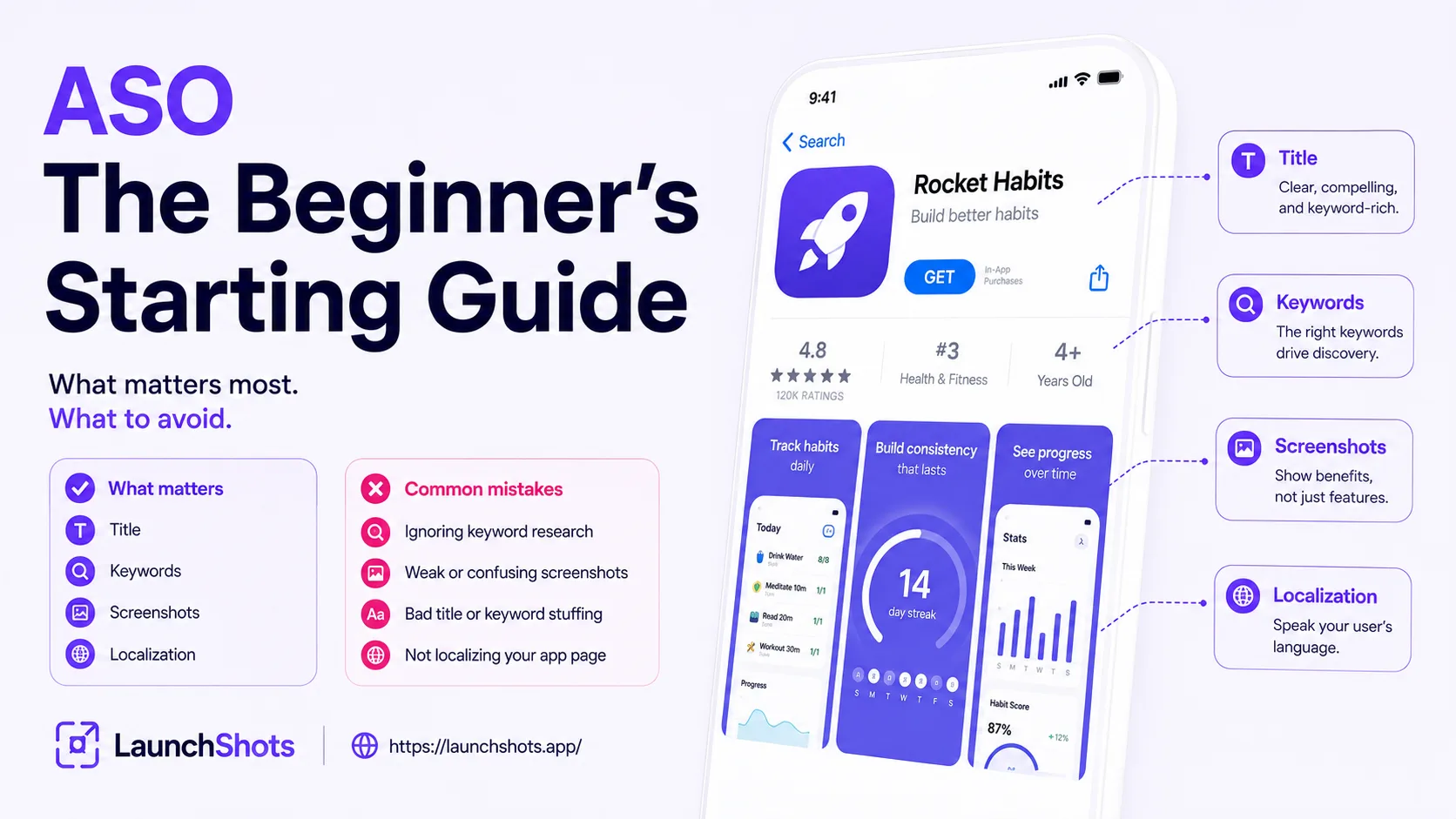
You can build the best app in your category and still get almost no downloads — because nobody finds it. With millions of apps across the App Store and Google Play, being good isn't enough; you have to be discoverable. That's what App Store Optimization (ASO) is for. This is a plain-English starting guide for indie developers: what ASO actually is, the handful of things that matter most, and the mistakes that quietly cost you installs.
What ASO is (and why it matters)
ASO is the practice of improving your app's visibility in the stores and turning that visibility into downloads. Think of it as SEO, but for app stores. And it's not a niche tactic — by Apple's own numbers, roughly two-thirds of App Store downloads come from a search. That makes the words in your listing one of the highest-leverage things you can work on. If you only invest in one growth channel early on, this is the one with the best return, because organic search traffic keeps coming long after a paid campaign stops.
ASO breaks into two halves: getting found (keywords and metadata that rank you in search) and getting installed (icon, screenshots, and copy that convince people to tap "Get"). You need both. Ranking high is useless if nobody installs once they land, and a beautiful listing is useless if nobody ever sees it.
Your title is the single most important field
Across both stores, your app title carries the most ranking weight of any text field. So it shouldn't just be your brand name — it should pair your brand with your most important keyword. "Notion — Notes, Docs, Tasks" works far harder than "Notion" alone.
The character limits are tight, so every word counts:
- App Store: Title 30 characters, Subtitle 30 characters, plus a hidden Keyword field of 100 characters.
- Google Play: Title 30 characters, Short description 80 characters (fully indexed — make it read naturally), Long description up to 4,000.
Put your strongest keyword in the title, your secondary value proposition or keywords in the subtitle/short description, and the rest in the keyword field (iOS).
Keyword basics without the jargon
Keyword research just means figuring out the words real people type when they're looking for an app like yours. Start by listing what your app does in plain terms, then think about how someone who doesn't know your brand would search for it. "Habit tracker," "budget app," "photo collage maker" — the everyday phrases, not your internal feature names.
Two rules save you the most trouble:
- Don't repeat keywords across fields. Apple's algorithm already combines your title, subtitle, and keyword field — repeating the same word just wastes precious characters that could be covering another search term.
- Don't keyword-stuff your title. "Best Free Meditation Sleep Calm Relax App" looks like spam and hurts conversion. Write something that reads naturally to a human while including one or two real keywords.
The conversion half: icon, screenshots, copy
Once search brings someone to your page, your visuals close the deal — and they often matter more than the keywords that got them there. Your first two screenshots and your icon do most of the persuading. A worthwhile note for 2026: Apple now reads the text in your screenshots with OCR, so clear, keyword-relevant captions help you on both fronts — they convert and they're indexable.
If you want a deeper dive on the visual side, we have a full guide on screenshots that convert. The short version: lead with benefits, keep text big and high-contrast, and make the first three screenshots unmissable.
Localize for the markets that matter
If you're only listing in English, you're leaving downloads on the table. Localized listings — translated title, description, and screenshots — increase downloads by a meaningful margin in non-English markets, often around 30%. You don't have to do every language; even translating your listing for two or three of your biggest non-English markets can move the needle.
Common beginner mistakes
- Putting a year or version in your title ("AppName 2026"). It looks spammy and violates Play Store rules. Use the proper version field.
- Treating ASO as one-and-done. Competitors change, trends shift, algorithms update. Plan to revisit your metadata roughly monthly.
- Obsessing over keywords while ignoring visuals (or vice versa). Both halves matter.
- Ignoring ratings and reviews. They feed ranking and conversion — prompt happy users to rate, and read reviews for keyword and feature ideas.
Where to start today
You don't need to do everything at once. Get the fundamentals right first: a title with your main keyword, a subtitle that adds value, a clean keyword field with no repeats, and strong first screenshots. Then iterate. You can often see ranking changes within a few weeks of improving your metadata.
When you're ready to write your listing, our free ASO description writer gives you live character counters for the title, subtitle, keywords, and description — tuned to the exact App Store and Play Store limits above — so you can craft everything without guessing what fits. It's free, no signup, and runs in your browser.
Related posts
Make your App Store screenshots free
LaunchShots is a free, in-browser screenshot maker. No signup, no watermark.
Open the app →
Comments (0)