What is app-ads.txt, and how do I create one?
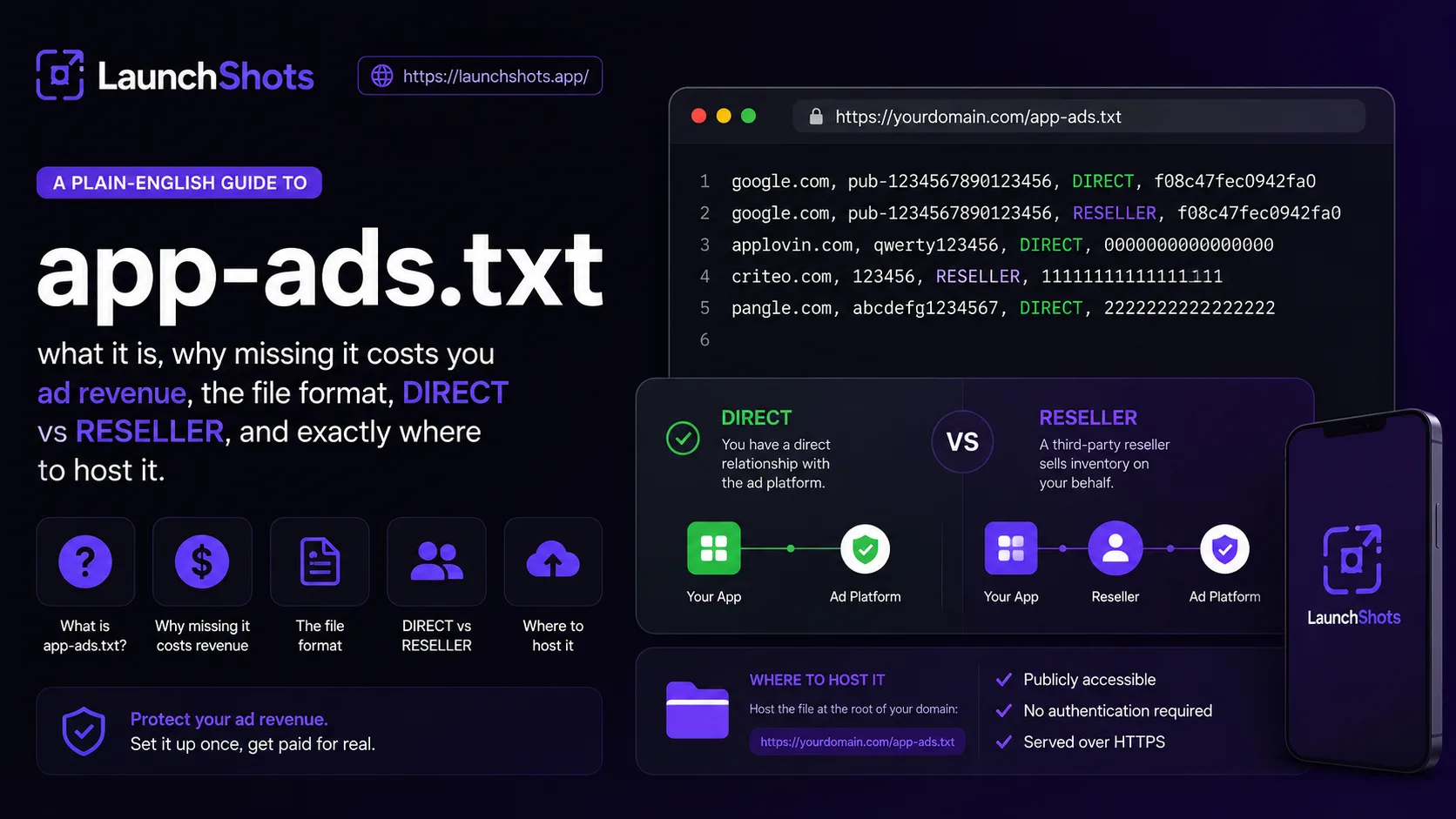
If your app shows ads and you've ever opened your AdMob or AppLovin dashboard to a warning about a "missing app-ads.txt file," you've hit one of the quieter gatekeepers of mobile monetization. It's a tiny text file, it takes five minutes to set up, and skipping it can quietly cost you ad revenue. Here's what it is, why it matters, and exactly how to create one.
What is app-ads.txt?
app-ads.txt is a standard from the IAB Tech Lab — the same group behind the web's ads.txt. It's a plain text file that publicly lists which ad networks are authorized to sell ad space in your app. Buyers check it before they bid, so any spoofed or unauthorized inventory claiming to be yours gets rejected.
In plain terms: it's a public note that says "these companies, and only these, are allowed to sell ads on my behalf." That single file is what lets the ad ecosystem trust that the inventory it's buying is really yours.
Why it matters for your revenue
Ad fraud is a multi-billion-dollar problem. One common trick is spoofing — a fraudster claims to have your app's ad inventory and sells it cheaply, siphoning money that should be yours and eroding trust in your traffic. app-ads.txt shuts that door.
More practically: many ad networks and demand partners won't bid at full value — or won't bid at all — on inventory from an app that doesn't have a valid app-ads.txt. So the file isn't just anti-fraud hygiene; missing it can directly lower your eCPMs. If you've seen a network warning about it, that warning is money on the table.
What the file actually looks like
It's about as simple as a config file gets. Each line declares one authorized seller, with comma-separated fields:
ad-system-domain, publisher-id, relationship, certification-id
A real line for Google AdMob looks like this:
google.com, pub-0000000000000000, DIRECT, f08c47fec0942fa0
Breaking that down: google.com is the ad system's domain, pub-… is your publisher ID with that network, DIRECT is the relationship, and the last value is an optional certification ID. You add one line per network you actually work with.
DIRECT vs RESELLER
The third field trips people up, but it's straightforward:
- DIRECT means you have a direct account with that ad network. You signed up, you log in, that's your publisher ID.
- RESELLER means a third party is authorized to sell your inventory on your behalf — for example a mediation partner that resells through other exchanges.
When in doubt, your network tells you exactly which line to use. Every major network publishes its required app-ads.txt entry in its dashboard or docs — copy those exact values rather than guessing, because a wrong domain or relationship means the line simply won't verify.
Where the file goes (the part people get wrong)
This is the step that catches most people. app-ads.txt does not go in your app bundle, and it doesn't go just anywhere on the web. It goes at the root of the developer website listed on your store page.
- Whatever URL you put in the "Developer Website" / "Marketing URL" field on the App Store or Google Play is the domain crawlers check.
- The file must be reachable at exactly https://yourdomain.com/app-ads.txt — root level, lowercase filename.
- The domain in your store listing and the domain hosting the file have to match. If your Play listing points to example.com, the file has to live at example.com/app-ads.txt.
After you upload it, networks re-crawl on their own schedule — it can take a few days for the warning to clear and for verification to show as complete. That delay is normal; don't panic if it isn't instant.
Common mistakes
A few things that quietly break the file:
- Wrong location. Putting it in a subfolder, or on a domain that doesn't match your store listing. It must be root-level on the exact listed domain.
- Typos in the publisher ID. One wrong character and that line won't verify. Copy-paste from the network, never retype.
- Listing networks you don't use. Only include lines for networks you actually have accounts with. Extra lines don't help and can confuse audits.
- Wrong relationship. Marking something DIRECT when it's actually a reseller (or vice versa). Use exactly what the network specifies.
- Forgetting to update it. Add a new mediation partner? You need to add their line too, or that demand won't bid at full value.
Build yours in a couple of minutes
You don't need to memorize the format or hand-type domains. Our free app-ads.txt Generator lets you pick your ad networks from a list — AdMob, AppLovin, Unity, ironSource, Meta, Mintegral and more — paste in your publisher ID, choose DIRECT or RESELLER, and it builds a valid file for you. Copy it or download the ready-named app-ads.txt, then drop it at the root of your developer website.
It runs entirely in your browser — no signup, nothing uploaded, just the file you need.
The short version
app-ads.txt is a small public text file that tells ad networks who's allowed to sell your app's inventory. It fights fraud and protects your eCPMs — and many networks need it before they'll bid properly. Each line is domain, publisher-id, relationship, cert-id; you host it at the root of the developer website on your store listing; and it takes a few days to verify after upload.
When you're ready, open the generator, pick your networks, and ship the file. It's free, no signup, and runs entirely in your browser.
Related posts
Make your App Store screenshots free
LaunchShots is a free, in-browser screenshot maker. No signup, no watermark.
Open the app →
Comments (0)